

Status rule
What it is for
Section titled “What it is for”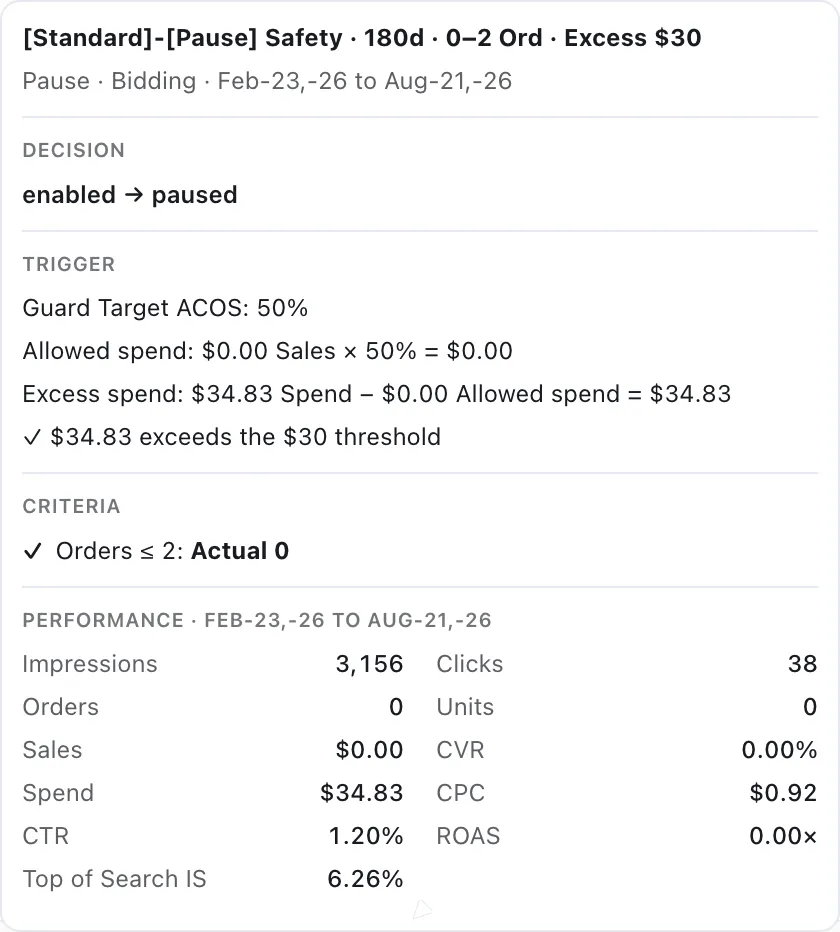
A Status change carries the same evidence as any other rule: the arithmetic that produced it, not just the verdict.
Every other Automation rule changes how much you pay or what you target. The Status rule changes whether a target runs at all: it enables or pauses a keyword or product target when the conditions you set are met.
It is the blunt instrument of the set, and that is the point. Some targets do not need a smaller bid — they need to stop.
How it will differ from the others
Section titled “How it will differ from the others”It acts on the target’s state, so there is no bid arithmetic, no per-run movement cap, and no bid boundary to clamp. The decision is binary.
The early-release settings do not apply. A bid change accumulates evidence — clicks and spend tell you whether the new bid was right. Pausing a target produces no evidence at all, so a Status rule waits out its full cooldown rather than releasing early.
The safeguards still apply. See Negation and unnegate rule for the checks that run before any rule changes anything.
What it would be for
Section titled “What it would be for”- Stopping a target that has spent past any defensible threshold with nothing to show.
- Pausing targets outside a season, then enabling them when it returns.
- Taking a target out of service while you rebuild the campaign around it.
For turning an ad group off and on by hour rather than a target by performance, that already exists: see the Dayparting rule.
VendlenPrivacy PolicyTerms of ServiceContact
© 2026 HELODA PTE. LTD. Not affiliated with or endorsed by Amazon.