

Alert Center
Most damage to an Amazon account does not announce itself. A main image gets replaced, a shipment arrives short, a fee changes — and you find out weeks later from a sales figure that stopped making sense.
Alert Center watches for those changes on the active seller profile and tells you when one happens.
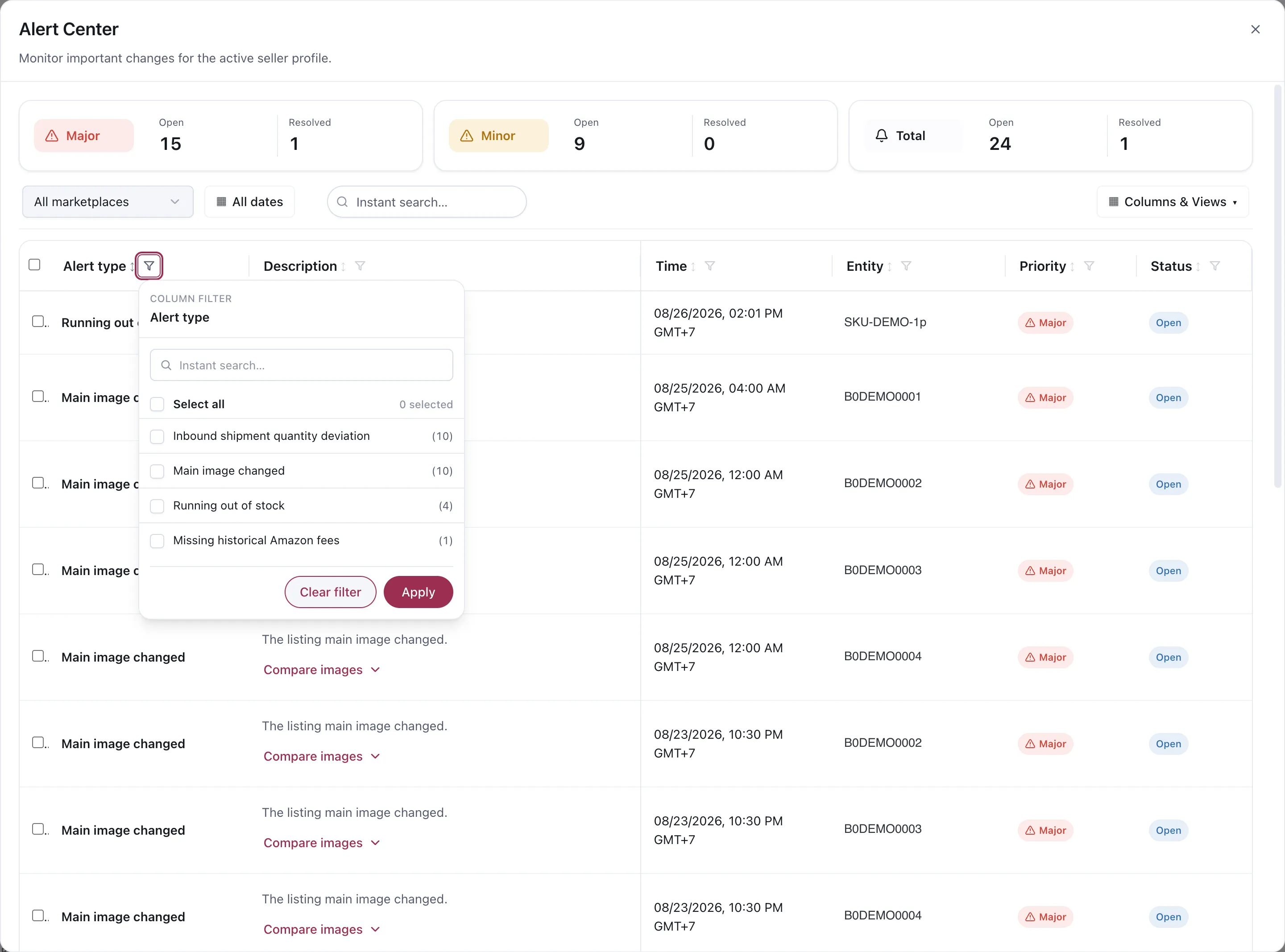
Alert Center. Entity identifiers shown are demo replacements.
What it watches
Section titled “What it watches”| Alert | Why it matters |
|---|---|
| Main image changed | Your listing’s main image is not what you last approved |
| Running out of stock | A product is heading for a stock-out |
| Inbound shipment quantity deviation | What arrived does not match what you sent |
| Missing historical Amazon fees | Fee data Amazon has not reported, which leaves profit figures incomplete |
Each type carries its own count in the filter, so you can see the shape of what is open before reading any of it.
Why a changed main image is Major
Section titled “Why a changed main image is Major”It is the one people underestimate. The main image is most of your click-through rate, and it can be changed without you doing anything — by Amazon, by a bulk feed, by another seller on a shared listing. A silent swap can halve conversion while every advertising metric still looks like a targeting problem.
The alert carries a Compare images control, so you can see what changed rather than trying to remember what was there.
Major and Minor
Section titled “Major and Minor”Alerts are split by priority and counted separately, open and resolved.
Major is something acting on your listing or your stock right now. Minor is worth knowing and not urgent.
The number to watch is open Major. A count that keeps growing means alerts are being raised and nobody is closing them, which is worse than not having alerts at all — it trains you to ignore the panel.
Working through them
Section titled “Working through them”Filter by type rather than reading top to bottom. Ten “main image changed” alerts are one investigation, not ten.
Check the entity and the time. Several alerts on the same ASIN in one window usually share a cause.
Resolve deliberately. Resolved means you looked and acted, or you looked and decided it was fine. Both are decisions; leaving it open is not.
How it relates to advertising
Section titled “How it relates to advertising”Alert Center is a separate operating surface. It is not an input to the AI Analyst, and no rule reads it.
That separation is worth knowing when you diagnose a drop. Advertising performance that falls off a cliff is often not an advertising problem — a listing change or a stock-out will do it, and Automation will keep dutifully optimising bids against a product that cannot convert. Check here before you rewrite the rules.
Considerations
Section titled “Considerations”- Alerts cover the active seller profile. Switch profiles to see another one’s.
- Filters cover marketplace and date range as well as type.
- An alert tells you something changed. It does not tell you who changed it — for advertising changes Vendlen made, see Change History.
VendlenPrivacy PolicyTerms of ServiceContact
© 2026 HELODA PTE. LTD. Not affiliated with or endorsed by Amazon.