

Momentum Guard
Available on Bidding rules. Momentum Guard exists for the one thing a single window cannot show you: a target that is still acceptable on the long record while it is quietly falling apart.
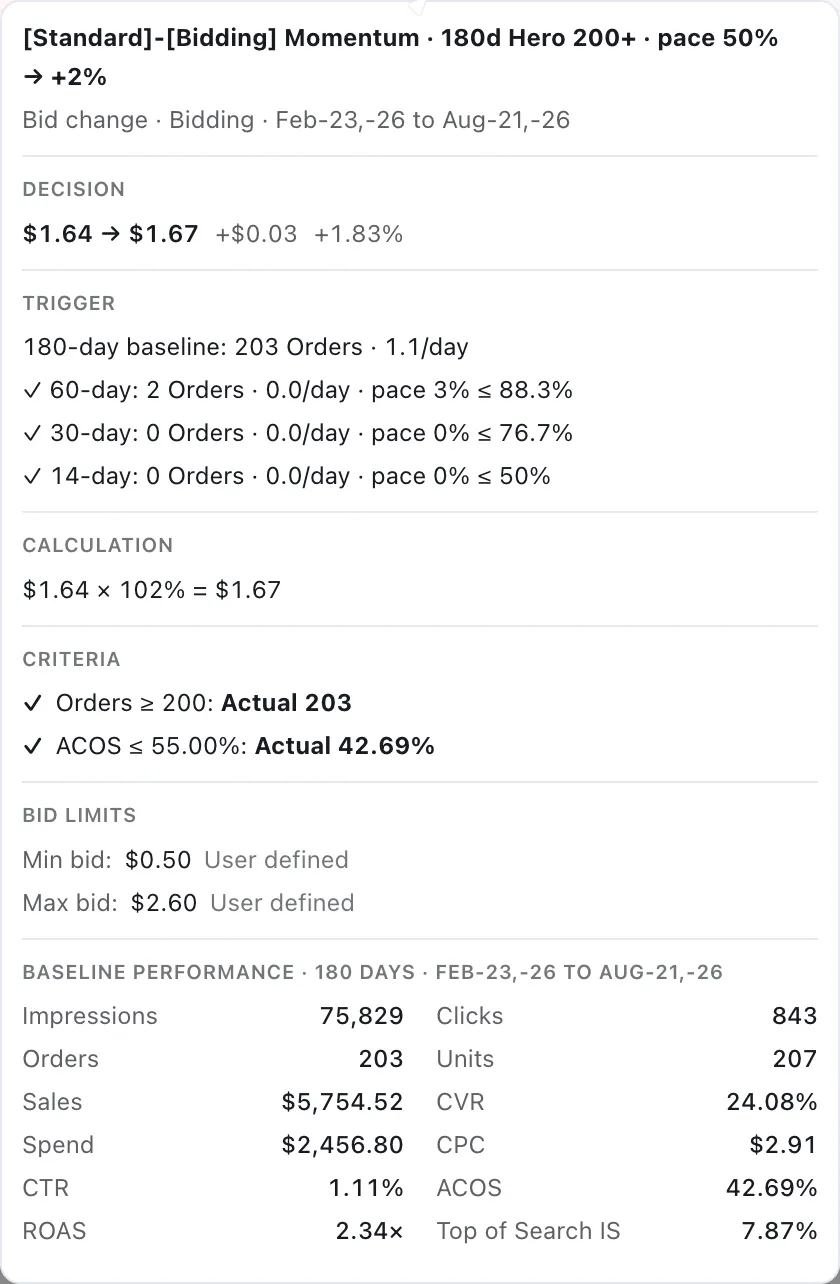
The analysis names which checkpoints triggered and shows every checkpoint against its own threshold.
What it measures
Section titled “What it measures”The rule holds a long baseline and checks the target’s order pace at several shorter checkpoints. The baseline is where the Criteria are evaluated; the checkpoints are where pace is compared.
| Setting | Values |
|---|---|
| Baseline | 90, 120, 150, or 180 days |
| Baseline Criteria | Required. Evaluated over the baseline window |
| Checkpoint ladder | Fixed at 60, 30 and 14 days |
| Fast checkpoint | 7, 14, or 30 days — 14 by default |
| Recent Pace threshold | Required. Above 100% demands growth rather than merely holding |
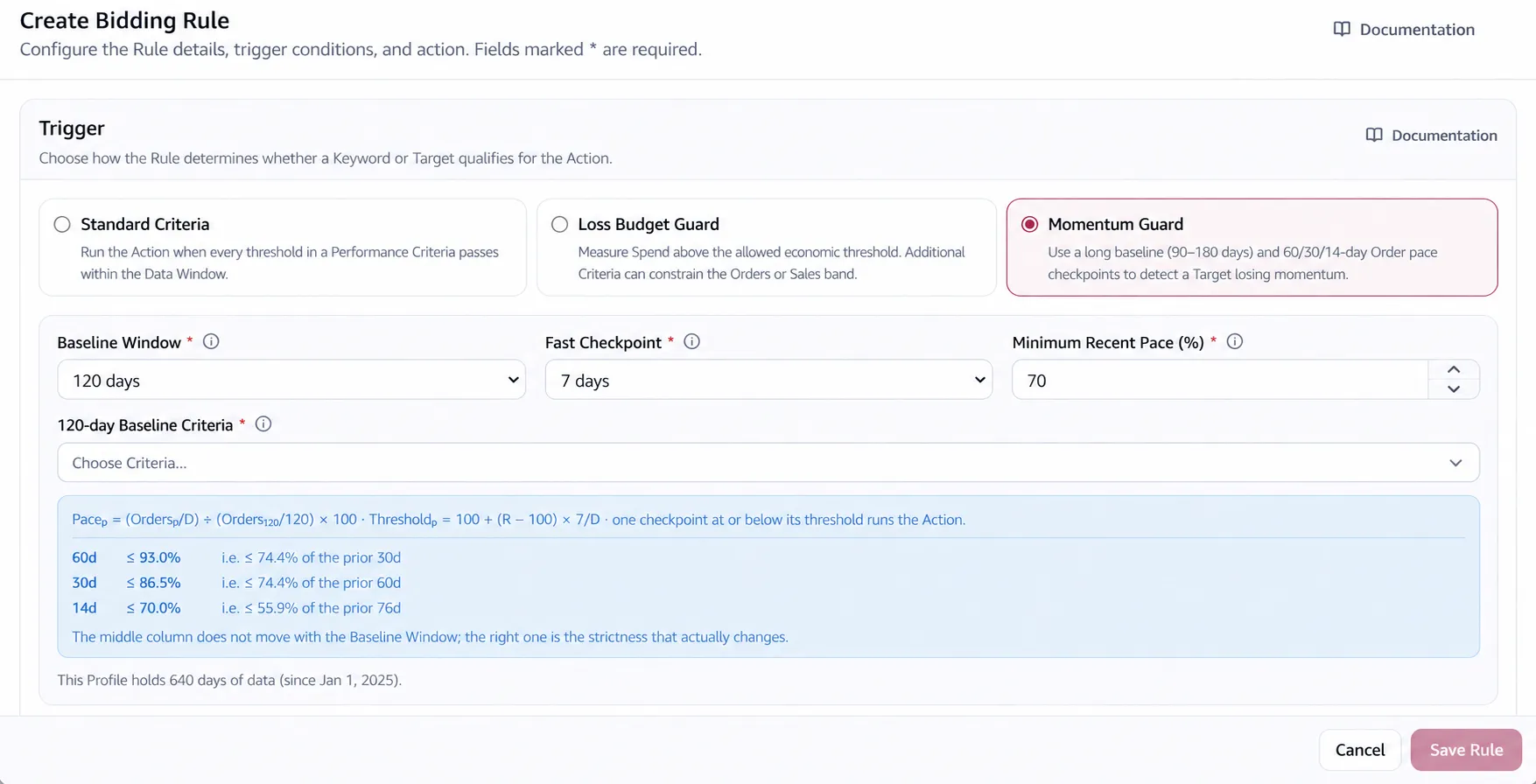
The fast checkpoint is merged into the ladder and replaces any shorter rung: choosing 7 gives you 60, 30, 14 and 7, while choosing 30 leaves only 60 and 30. The ladder does not stretch when the baseline grows: a 180-day baseline still checks the same marks.
Drawn with a 90-day baseline, a 14-day fast checkpoint and a Recent Pace threshold of 130%. The derived thresholds shown are what that setting produces at 30 and 60 days; the ladder itself is fixed at 60, 30 and 14 whatever baseline you choose.
Why pace, and not a number
Section titled “Why pace, and not a number”Pace is the target’s orders per day over a window, as a percentage of its orders per day over the baseline. 100% means it is keeping up with itself; 40% means it is producing two orders where it used to produce five.
Pace at D days = (Orders at D ÷ D) ÷ (Baseline Orders ÷ Baseline days) × 100That is the one thing ACOS cannot show you. A target bringing thirty orders a month at 45% ACOS, then three orders a month at 45% ACOS, passes every efficiency threshold ever written. The underlying business may no longer be operating, and the ratio alone will not make that clear.
Pace also means the same thing at every checkpoint and on every target, so one threshold covers a hero keyword and a long-tail one, and keeps working as the account grows.
One threshold sets the ladder
Section titled “One threshold sets the ladder”You set one Recent Pace threshold. It applies to the fast checkpoint, and the longer ones are derived from it. At Recent Pace 50% with the default 14-day fast checkpoint:
Threshold at D days = 100 + (Recent Pace − 100) × Fast checkpoint days ÷ D| Checkpoint | Fires at or below |
|---|---|
| 14 days | 50.0% |
| 30 days | 76.7% |
| 60 days | 88.3% |
Each row represents a similar shortfall against the target’s baseline. Two weeks at half pace and two months at 12% below pace both amount to roughly one week of missed orders. The rule treats them as the same decline across different windows.
Keeping all three matters because the short one does not always break first. A target that stops converting overnight breaks the 14-day mark; a target that loses twelve percent and stays there never has a fortnight bad enough, and breaks the 60-day mark instead.
What changes when the baseline changes
Section titled “What changes when the baseline changes”The checkpoint threshold above depends on the Recent Pace setting, fast checkpoint and checkpoint length — not on the baseline length. That means the displayed threshold can stay the same when you switch from a 90-day to a 180-day baseline. The decision does not stay equally strict: each checkpoint is now compared with a different, longer definition of normal.
The same warning applies to a reused Baseline Criteria. Its Orders, Clicks, Impressions, ACOS and Spend thresholds are measured over each rule’s own baseline. The same Criteria numbers therefore mean something different on a 90-day rule and a 180-day rule.
The Criteria, then any one checkpoint
Section titled “The Criteria, then any one checkpoint”The rule fires when the Baseline Criteria pass and at least one checkpoint falls at or below its threshold. The Criteria decide whether the target is worth watching at all; the checkpoints are an OR, not an AND.
The evidence attached to the change names which checkpoints triggered, and shows every checkpoint’s pace against its own threshold.
When to use it
Section titled “When to use it”- A target that was good and has quietly stopped producing — a competitor arrived, the listing slipped, a season ended. The account looks fine; that target does not.
- When ACOS stays flat while volume drains.
- When seasonality makes a fixed threshold impossible. The baseline moves with the account.
- Paired with an action. Momentum Guard says something is dying; a bid cut or a State change decides what to do about it.
When not to use it
Section titled “When not to use it”- On new targets. A baseline needs history. Use Standard Criteria.
- On targets that were never producing. Pace compares a target to its own past, and one that always converted badly has nothing to fall from.
- When you mean a level, not a direction. “Never run above 80% ACOS” is Standard Criteria.
Keep the Data Window short on these rules
Section titled “Keep the Data Window short on these rules”Two windows are in play and they do different jobs. The baseline and checkpoints decide whether to act. The Data Window decides how much to bid.
So a long Data Window undoes the work the trigger just did: the rule correctly finds that a target collapsed in the last fortnight, then prices the bid from months when it was still healthy. With glide on it is worse, because the current ACOS comes from the same window.
Leave the Data Window at its 90-day default, or shorter. The long memory this rule needs comes from the baseline, which is a separate setting.
The rule’s Days of recent data to ignore applies to the baseline and every checkpoint. They all end at the same settled-data anchor, rather than comparing a settled baseline with incomplete recent attribution.
Worked configuration
Section titled “Worked configuration”Suppose a productive target still passes its 90-day Baseline Criteria. Set the fast checkpoint to 14 days and Recent Pace to 50%. The App derives thresholds of 88.3% at 60 days, 76.7% at 30 days and 50% at 14 days.
If its measured paces are 91%, 73% and 58%, the 30-day checkpoint fires: 73% is at or below its 76.7% threshold. The other checkpoints do not need to pass because the ladder is an OR. The action then uses the Bidding Data Window — not the 90-day baseline automatically — to calculate the bid.
In the analysis popover, check the Baseline Criteria first, then compare every checkpoint’s actual pace with its own threshold. The checkpoint that crossed explains why the action ran.
Considerations
Section titled “Considerations”- The days a rule scans — and what your Automation Window must therefore allow — is the larger of the baseline and the Data Window, so the baseline is usually the one that sets the requirement.
- A target can be losing momentum and still be profitable. That is the early warning, arriving while the target is still worth saving.
- A checkpoint with no data is skipped, not treated as decline.
- A Recent Pace threshold above 100% turns the rule from “catch decline” into “demand growth” — a legitimate stance, and a much noisier one.
- Older rules may still show the legacy two-window Momentum configuration. They remain readable, but use the editor’s migration control before teaching or comparing them with the current checkpoint ladder.
VendlenPrivacy PolicyTerms of ServiceContact
© 2026 HELODA PTE. LTD. Not affiliated with or endorsed by Amazon.