

Negation word rule
The word rule solves a problem the ordinary negation rule cannot: a single word that is dragging down dozens of different search terms, none of which has enough traffic on its own to be worth negating.
It is a mode, not a separate rule
Section titled “It is a mode, not a separate rule”You reach it from the negation rule editor. Negative mode at the top of the dialog decides which of the two you are configuring:
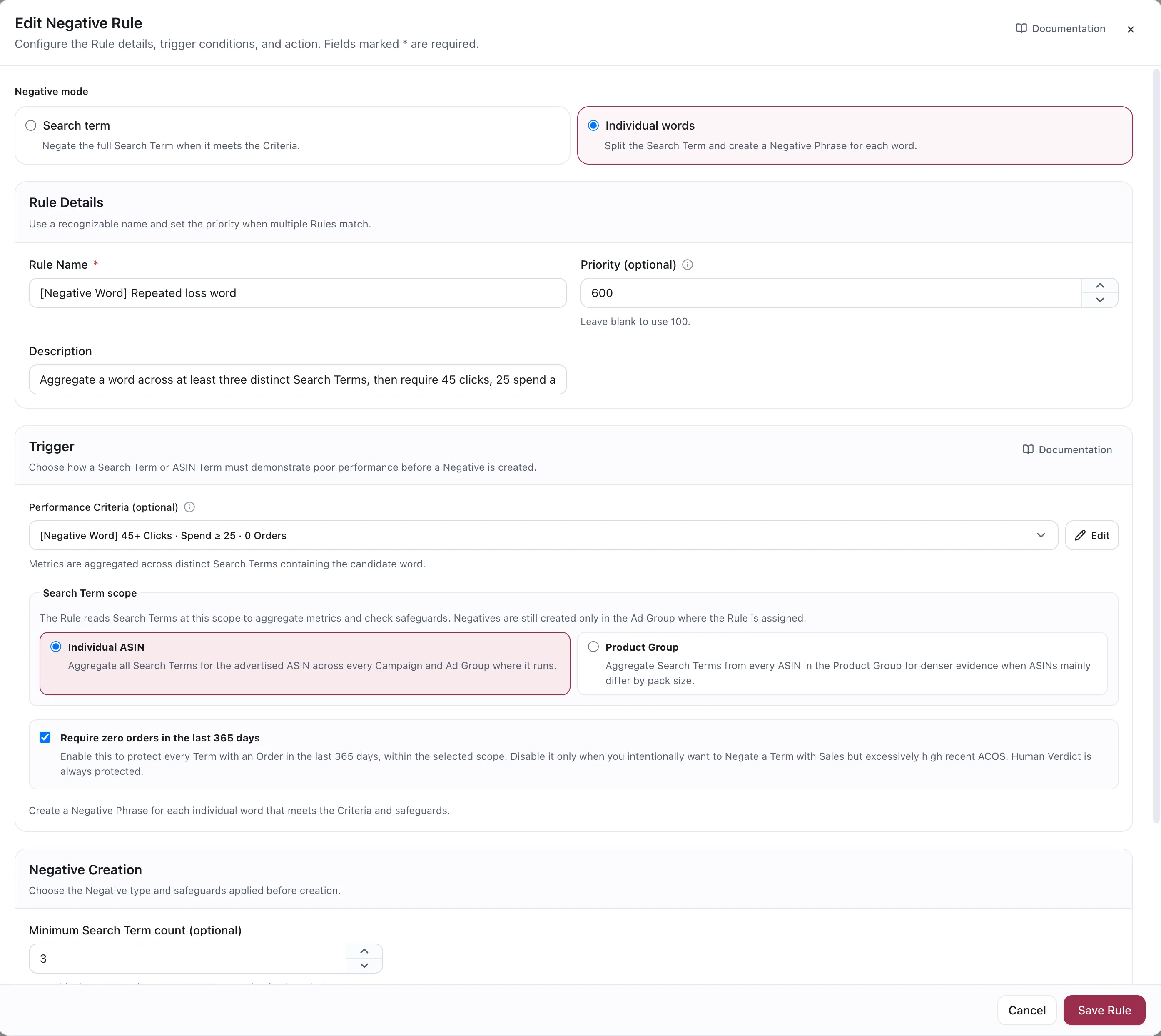
Individual words is selected. Everything below the toggle is the same editor as an ordinary negation rule.
| Negative mode | What it negates |
|---|---|
| Search term | The full search term, when it meets the Criteria |
| Individual words | The search term is split, and a Negative Phrase is created for each word that meets the Criteria |
What it does
Section titled “What it does”It looks for a word that appears across several distinct search terms, checks the combined evidence, and creates a Negative Phrase for that word. The dialog says so at the foot of the Trigger section: create a Negative Phrase for each individual word that meets the Criteria and safeguards.
This rule creates phrase negatives exclusively. It is designed to block a broader search pattern rather than a single query, including related queries that have not yet appeared in the data.
Configuration
Section titled “Configuration”| Setting | Default | What it does |
|---|---|---|
| Performance Criteria | — | Optional. Metrics are aggregated across the distinct search terms containing the candidate word |
| Minimum search term count | 3 | How many distinct terms must contain the word before it counts as a pattern. Range 2–100 |
| Search term scope | Individual ASIN | Whether to aggregate evidence at ASIN or Product Group level |
| 365-day orders safeguard | On | Skip words whose terms have converted in the last year |
Minimum search term count is the whole rule
Section titled “Minimum search term count is the whole rule”Set it to 2 and single coincidences start looking like patterns. Set it to 20 and you will only ever catch words so common you would have found them yourself. Three is a sensible default; raise it on a high-volume account.
The negative still lands locally
Section titled “The negative still lands locally”Widening the evidence does not widen the action. However many terms the word was found across, and whichever scope the evidence was read at, the Negative Phrase is created in the assigned ad groups where the word actually appeared — never at campaign level, and never in an ad group the rule is not assigned to.
Safeguards
Section titled “Safeguards”The same protections apply as on a negation rule: the 365-day orders safeguard is on by default, and a term already covered by an existing negative is skipped rather than negated twice.
Use cases
Section titled “Use cases”Block a competitor’s brand across the board
Section titled “Block a competitor’s brand across the board”Their brand name shows up inside forty different queries, each with two or three clicks. No single query justifies a negative; together they are a real amount of spend. One Negative Phrase ends it.
Kill a wrong-intent modifier
Section titled “Kill a wrong-intent modifier”free, used, refurbished, for kids — words that reliably describe a shopper who will not buy
your product at your price. They spread across many queries and never concentrate anywhere.
Cut off a compatible-product pattern
Section titled “Cut off a compatible-product pattern”Shoppers searching for something your product fits but is not. The pattern lives in a word, so that is where the block belongs.
A worked example
Section titled “A worked example”Across a 90-day window, 11 distinct search terms contain the word refurbished. Individually they
have 1–4 clicks each and no orders. Together: 26 clicks, $18.40 spent, nothing sold.
With minimum search term count = 3, the rule sees a pattern rather than eleven separate
non-events, and creates one Negative Phrase: refurbished. The 365-day safeguard passes it through
because none of those terms has produced an order in the last year.
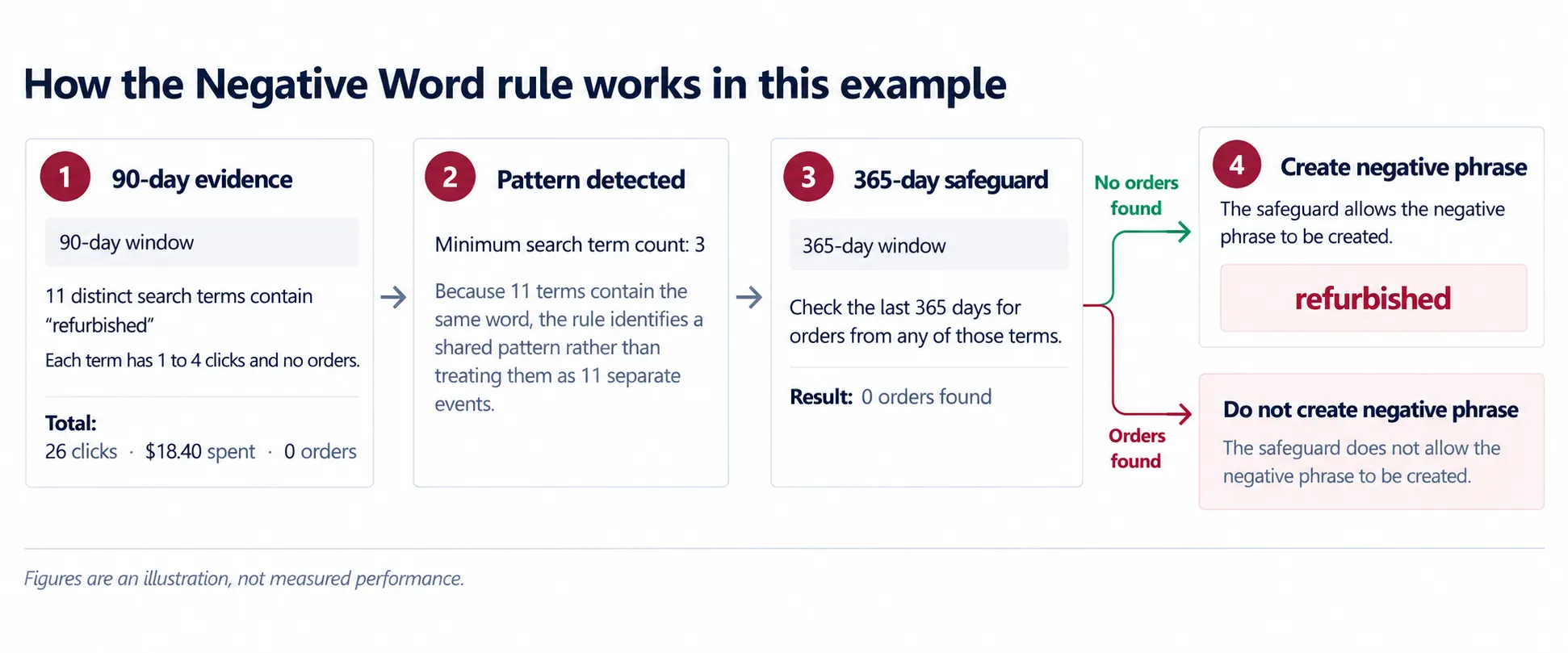
Figures are an illustration, not measured performance.
Considerations
Section titled “Considerations”- A phrase negative is wide by design. Check the word is not also inside queries you want —
caseblocksphone caseas well ascase of 12. - Words that are part of your own product name will show up in losing queries too. Blacklisting one of those is a slow, quiet way to remove your best traffic.
- Because the evidence is aggregated across terms, the scope setting matters as much here as anywhere: at Product Group scope a word is judged on the whole group’s queries.
VendlenPrivacy PolicyTerms of ServiceContact
© 2026 HELODA PTE. LTD. Not affiliated with or endorsed by Amazon.