

Reading a Decision Brief
A brief is built to be argued with. Every claim it makes shows the evidence underneath it, so you can disagree on specific grounds rather than on instinct.
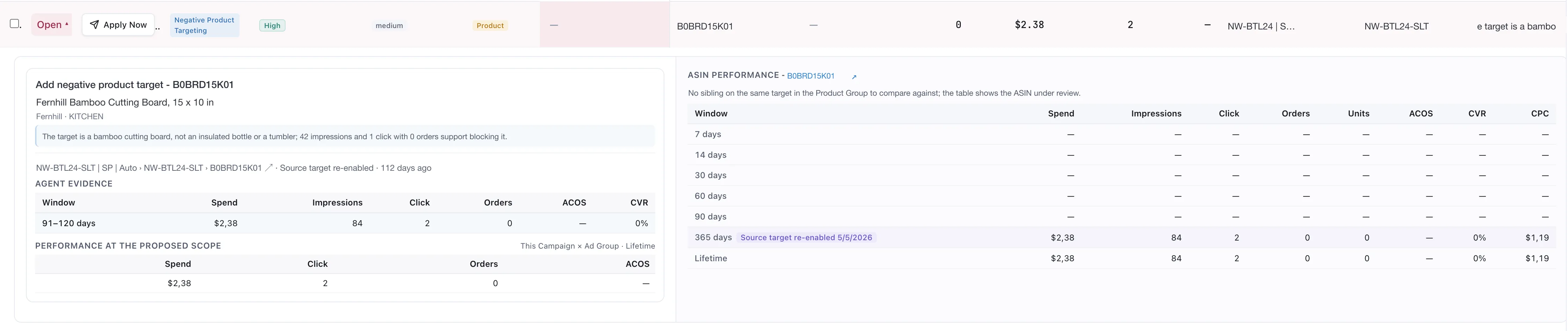
One brief, expanded. Identifiers and product names are demo replacements, and money in this capture is written with a comma as the decimal separator.
The row
Section titled “The row”Collapsed, a brief shows enough to triage without opening it:
Reading the row from the left:
| Field | What it tells you |
|---|---|
| Status | Open until the brief is dealt with |
| Apply Now | The action, one click away |
| Action | What kind of decision this is — Negative Keyword, Unnegate, Bid, Harvest Keyword, Negative Product Targeting and the rest. See Types of proposal |
| Confidence | High, Review or Finding |
| Priority | medium, and so on |
| Type | Keyword or Product |
| Entity, campaign, ad group | Where it applies |
| Reason | The first line of the argument |
Sort by priority, read by confidence. A high-priority, high-confidence brief is worth your attention first; a low-priority one can wait however confident it is.
The action and the reason
Section titled “The action and the reason”Expanded, the brief opens with what it wants to do and why, in a sentence:
The target is a bamboo cutting board, not an insulated bottle or a tumbler; the impressions and clicks it drew produced no orders.
Read that sentence carefully, because it usually contains two different kinds of claim:
- A judgement about the product — this target is the wrong thing.
- A threshold on a metric — and the traffic supports acting.
The first is the part a rule cannot make. See Types of proposal.
The path
Section titled “The path”Under the reason, the exact location: campaign, ad product, targeting type, ad group and the target itself — plus when it last changed and how long ago.
The last-changed note matters. A target changed three days ago has not had time to prove anything yet, and a brief proposing to change it again is worth a second look.
Agent evidence
Section titled “Agent evidence”The window the Analyst actually read, with the figures it read there.
This is a consecutive block, not a nested range — 91–120 days means that stretch, not
everything up to 120 days. Reading blocks against each other is how the Analyst finds a target that
broke its own pattern rather than one that merely looks bad on a long average. See
How the analysis works.
Several blocks, not one
Section titled “Several blocks, not one”Some briefs carry more than one block — 1–7 days, 8–14 days, 15–30 days, 31–60 days — either
as rows of the evidence table or as buttons above it.
Read them against each other rather than adding them up. Consecutive blocks are how a target that broke its own pattern is told apart from one that has simply always been poor.
Performance at the proposed scope
Section titled “Performance at the proposed scope”The same target measured at the scope the action would apply to — this campaign and ad group, over its lifetime.
This is the sanity check on blast radius. A brief can be right about the evidence and wrong about where to act, and this panel is where that shows.
ASIN performance, and siblings
Section titled “ASIN performance, and siblings”The right panel puts the product’s own numbers across several windows beside the decision.
When the product has siblings in its group, the table shows the ASIN under review against the siblings as one aggregated figure — not sibling by sibling. Values appear as a pair: this ASIN, and the rest of the group.
When it has none, the panel says so plainly rather than showing an empty comparison. And when the campaign already aggregates several ASINs, it says that too, so you do not read the same numbers twice.
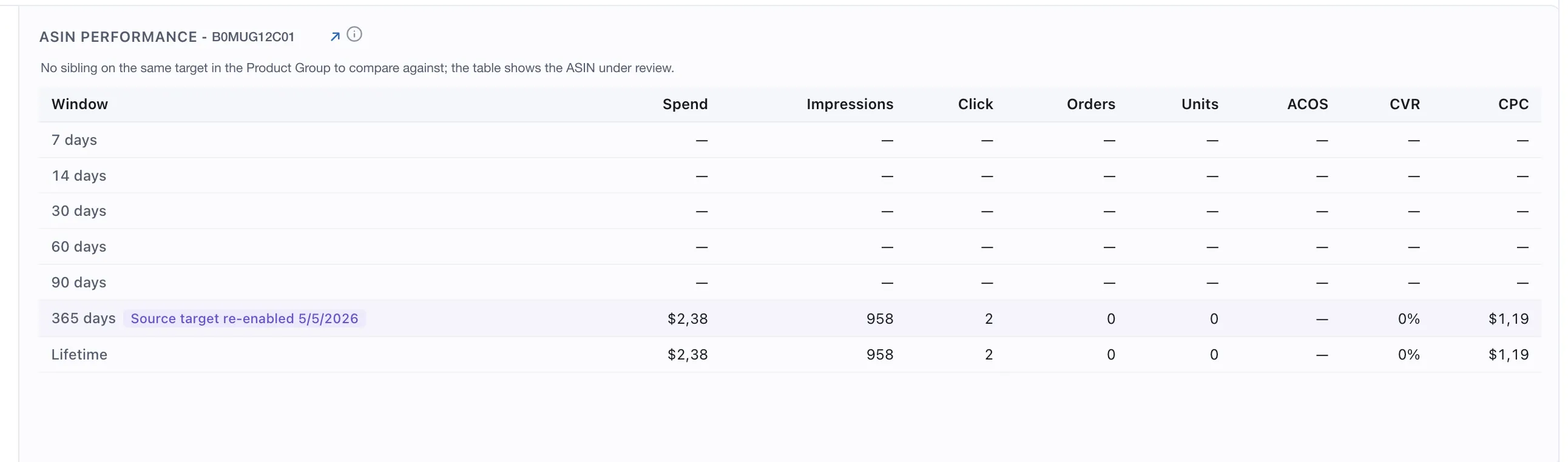
The no-sibling case, said plainly. An empty comparison would read as a comparison that failed.
Change markers appear on the window where something happened, which is what makes a before-and-after readable at a glance.
Deciding
Section titled “Deciding”Four questions, in order:
- Is the reason true? Not “is it plausible” — does it hold for your business.
- Is the window right? A short block on a slow-moving product is thin.
- Is the scope right? Check the proposed-scope panel, not just the evidence.
- Has this target just changed? If so, wait.
If all four hold, apply it. See Reviewing, rejecting and blocking.
VendlenPrivacy PolicyTerms of ServiceContact
© 2026 HELODA PTE. LTD. Not affiliated with or endorsed by Amazon.