

Change History
Change History is the account’s memory. Whatever moved a bid, a state, a negative, a placement or an audience — it is here, with what it changed from, what it changed to, and what caused it.
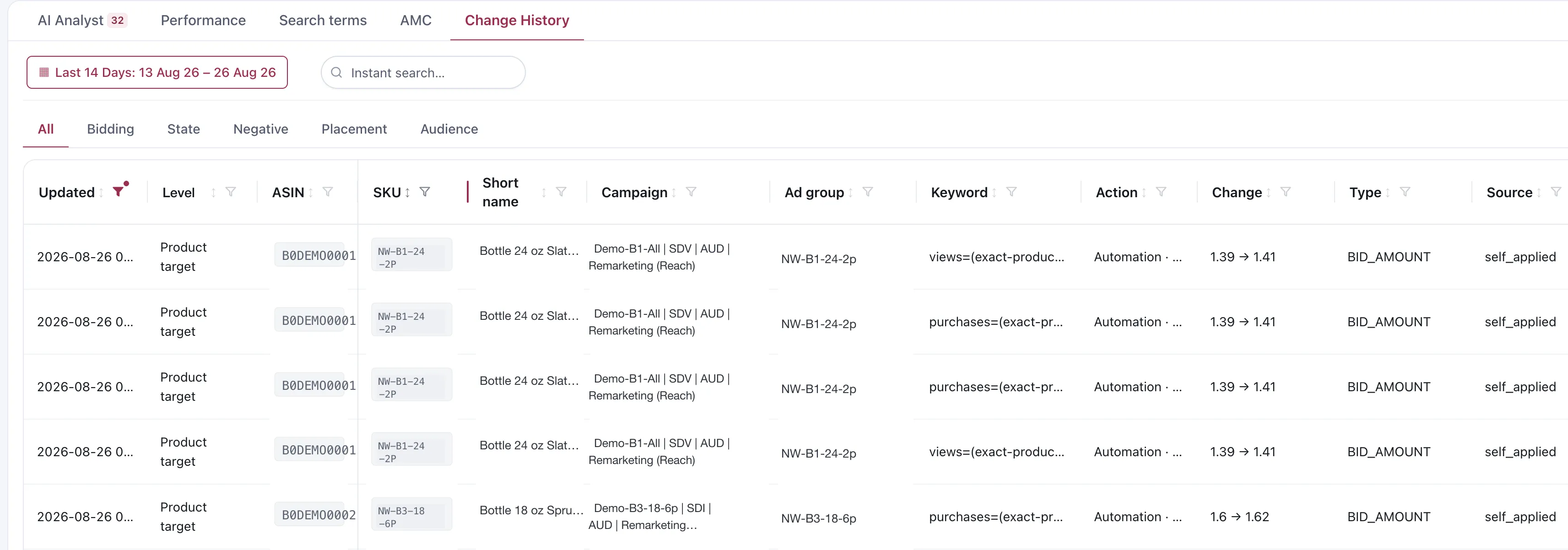
Change History. Every product, SKU, campaign and ad group value shown is a demo replacement.
What a row tells you
Section titled “What a row tells you”| Column | What it holds |
|---|---|
| Updated | When the change was recorded |
| Level | The entity level — keyword, product target, ad group, campaign |
| ASIN · SKU · Short name | Which product it belongs to |
| Campaign · Ad group | Where it happened |
| Keyword | The target itself, including targeting expressions |
| Action | How the change was made — a direct apply, an applied proposal, or an Automation run |
| Change | The old value and the new one, as from → to |
| Type | What kind of value moved |
| Source | What caused it |
The two columns that answer most questions are Change and Source.
Source: what caused it
Section titled “Source: what caused it”This is the column people come here for. It separates changes Vendlen applied itself from changes Amazon reported from its own history — which is how you tell your own work apart from an edit made somewhere else.
The row does not name the individual rule. Action tells you the mechanism — a direct apply, an applied proposal, or an Automation run.
Six months from now, “why is this bid 1.41?” has an answer rather than a theory.
Filtering
Section titled “Filtering”The tabs across the top split the record by what changed: Bidding, State, Negative, Placement, Audience, or All. The date range and instant search narrow it further, and every column carries its own filter.
The usual way in is a date range around when something looked wrong, then the tab for the kind of value that moved.
What is not here
Section titled “What is not here”Dayparting. Its hourly bid and state changes are a transient overlay rather than a canonical edit, so they do not appear in Change History. Read the Dayparting run instead — see the Dayparting rule.
Changes nobody applied. A row in Preview Changes that was never applied did not change the account, so there is nothing here to record.
Considerations
Section titled “Considerations”- Change History carries both what Vendlen applied and what Amazon reports from its own change history, so an edit made directly in Amazon’s console does show up. The real limit is Amazon’s: its history API only serves the last 90 days, which is why Vendlen pulls it every day and accumulates it — a gap in that record cannot be rebuilt afterwards.
- A rule that ran and changed nothing produces no rows here. If you are checking whether a rule worked, the run tells you more than the history does — see Why didn’t my rule run?
VendlenPrivacy PolicyTerms of ServiceContact
© 2026 HELODA PTE. LTD. Not affiliated with or endorsed by Amazon.