

Search terms workspace
Search terms are what shoppers actually typed. Keywords are what you bid on. The gap between the two is where most of the money is won or lost, and this workspace is where you look at it.
Quick filters
Section titled “Quick filters”The account has far more search terms than anyone reads. Filters are how you get from all of them to the handful worth a decision — and once you have a good one, you save it.
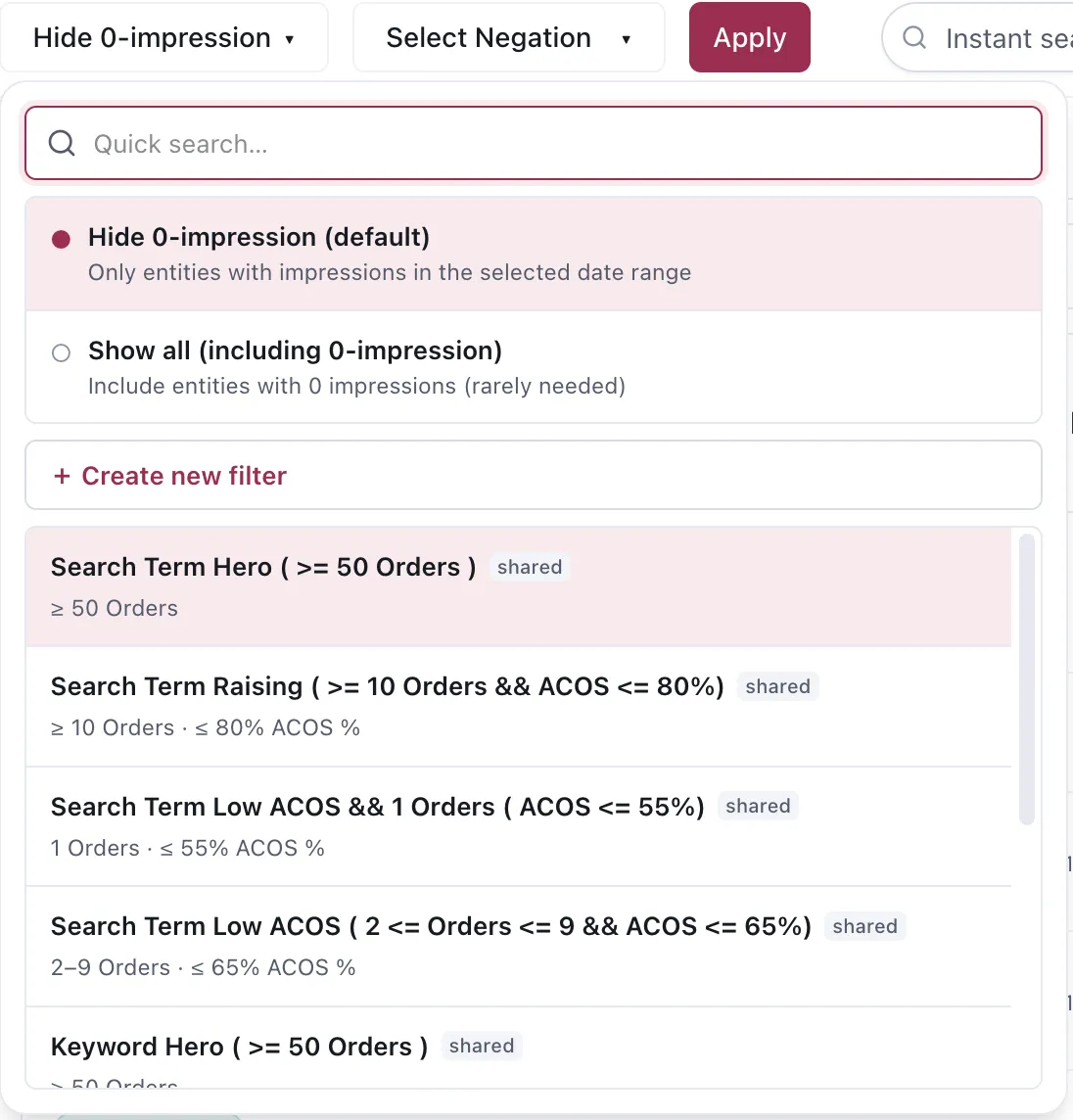
Saved filters carry their conditions in the name and in a summary line, and can be shared.
Hide 0-impression is on by default and should usually stay on. An entity with no impressions in the selected date range has nothing to tell you.
Create new filter saves a set of conditions under a name. Because the name is yours, the useful
habit is to put the condition in it — a filter called Search Term Hero ( >= 50 Orders ) tells you
what it does without opening it, six months later.
Shared filters are visible to the rest of the profile. A team reading the same account through the same definitions of “hero” and “raising” is a small thing that removes a lot of argument.
Filters worth having
Section titled “Filters worth having”The pattern that works is one filter per decision you actually make:
| Filter | Roughly |
|---|---|
| Hero | High orders — protect, and consider harvesting |
| Raising | Decent orders with acceptable ACOS — room to push |
| Low ACOS, few orders | Efficient but thin — watch, do not act yet |
| Losing | Spend with no orders — negation candidates |
The negation filter
Section titled “The negation filter”The other question this workspace answers is: is this term already blocked, and where?
The grouping matters, because a negative at campaign level behaves differently from one in a single ad group. A term you blocked in one ad group can still be running everywhere else in the campaign — which is exactly the case unnegation exists for.
Not negated is the inverse and just as useful: everything still running, so you can look at what is spending without a block on it.
Possibly blocked
Section titled “Possibly blocked”Possibly blocked is for a term with no active negative the App can find, but whose traffic loss looks suspicious. A search term qualifies when:
- it recorded at least 10 orders in the last 180 days;
- its impressions in the latest 14 days are zero or at least 90% below the preceding 14 days; and
- the same term still receives impressions in another ad group in the account.
The last condition helps separate a local block from a term whose demand has simply disappeared. The tooltip explains What is happening, Why it is suspicious and What to check.
This filter does not return a term with a negative the App can identify. Use Fully blocked for those rows. The signal is rebuilt by Daily Ads restatement after a complete fetch, scheduled for 07:00 Vietnam time, so it is not real-time and can be empty until the first nightly build after the feature is enabled.
Excluding a term from Automation
Section titled “Excluding a term from Automation”Select terms, then choose Exclude in the action bar. A search-term exclusion controls which negative action Automation must not take:
- All kinds
- Negative Exact only
- Negative Phrase only
The hold belongs to the selected ad group, not the whole seller account. Set it for 7, 14 or 30 days, choose a custom 1–365 days, or choose No end date.
The App saves the hold against the term’s close-variant family. Excluding hibiscus tea therefore
also excludes hibiscus teas. Saving another spelling replaces the existing hold for that family;
removing the exclusion removes it for the whole family.
Use the Excluded from Automation · N chip at the far right of the action bar to show only held rows. Automation previews and scheduled runs omit them. Dayparting, Agent proposals and your direct changes are not covered by this hold.
Reading a term before acting
Section titled “Reading a term before acting”Three questions, in order:
- Is there enough of it to mean anything? A term with four clicks has not told you anything yet, however bad those four clicks look.
- Which window am I reading? The same term reads differently over 14 days and 90. See Evidence and periods.
- Whose evidence is this? A term thin on one ASIN may be dense across its Product Group.
Considerations
Section titled “Considerations”- Search term data lags. The most recent days understate orders because Amazon’s attribution is still arriving — the same reason Automation ignores them by default.
- A search term is not a keyword. Harvesting is what turns one into the other; see Harvest, negate and unnegate.
- Filters change what you see, not what exists. A term hidden by a filter is still spending.
VendlenPrivacy PolicyTerms of ServiceContact
© 2026 HELODA PTE. LTD. Not affiliated with or endorsed by Amazon.