

Objectives and assignments
Two ideas are easy to confuse, and that can make a correctly configured rule appear inactive.
- An Objective is a reusable set of rules that work together.
- An assignment determines which ad groups those rules run on.
A rule without an assignment, either directly or through an Objective, has nothing to evaluate. It produces no error or output, which is why it can appear not to work.
An Objective is a set of rules
Section titled “An Objective is a set of rules”It is not a named strategy you pick from a list. You build it by putting rules into it, and it means whatever those rules mean together.
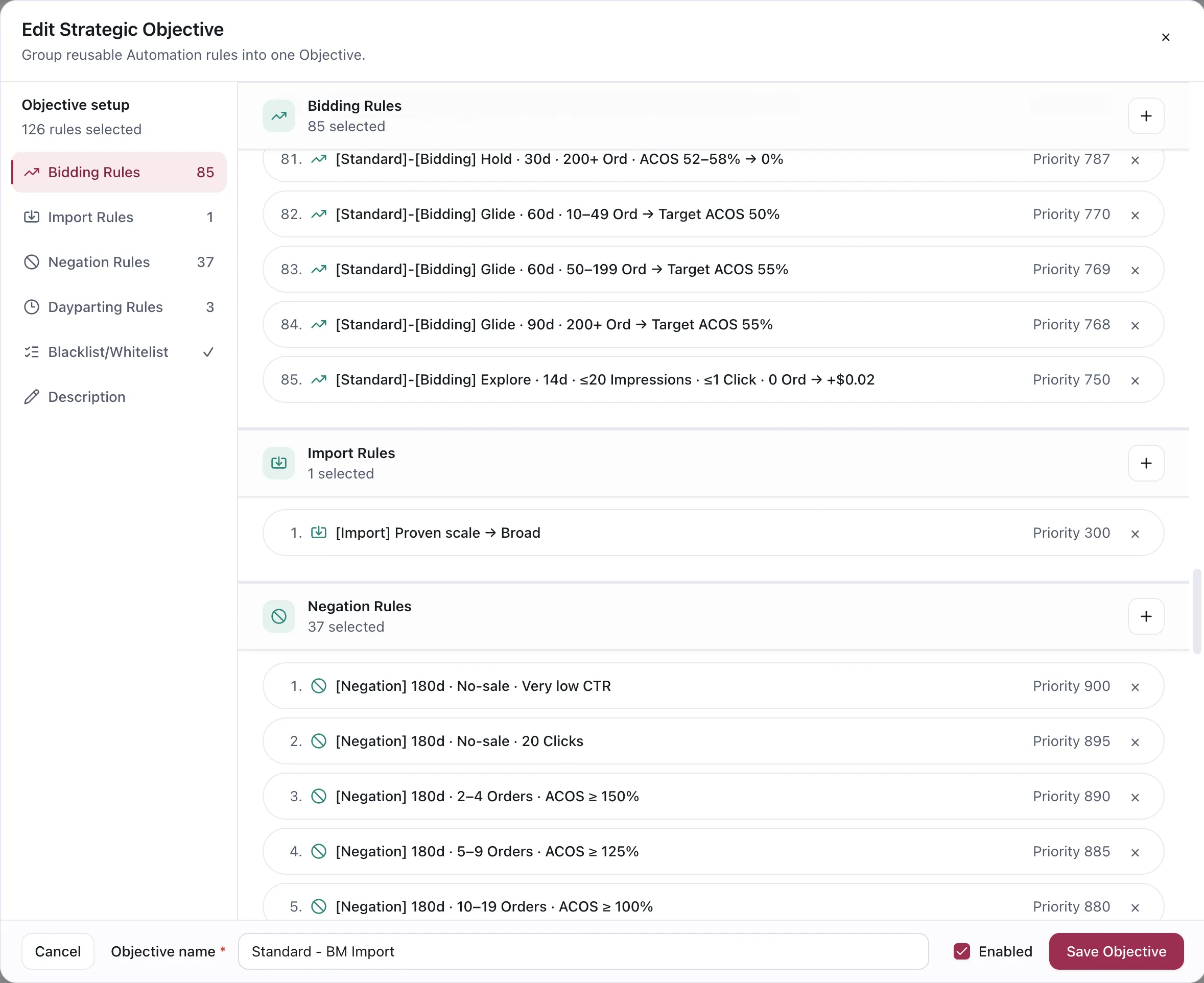
An Objective is assembled from rules you have already written. Each carries its own priority.
An Objective gathers rules by family:
| Family | What it contributes |
|---|---|
| Bidding | Moves bids toward the economics |
| Import | Harvests proven search terms into targeting |
| Negation | Blocks and restores search terms |
| Dayparting | Acts on the clock rather than on performance |
| Blacklist / Whitelist | Per-ASIN lists that create negatives or protect terms |
Dayparting sits inside an Objective but works differently from the others: each marketplace day the App picks exactly one Dayparting rule per Objective, based on Criteria checked against the Objective’s aggregated 30-day and 60-day performance.
Objectives get large
Section titled “Objectives get large”A working Objective is not three rules. It is normal for one to hold dozens — a bidding family covering every order band and ACOS range, a negation family covering every combination of order count and ACOS threshold, and a single import rule.
That is why they are assembled once and reused, and why the rule names in the editor carry their own
configuration: [Negation] 180d · 2–4 Orders · ACOS ≥ 150% tells you what it does without opening
it, which is the only way a list that long stays readable.
Why group rules at all
Section titled “Why group rules at all”Because the rules that make sense together tend to travel together.
A harvest rule with no negation rule beside it grows targeting and never prunes it, and a negation rule with no unnegation rule beside it can only ever narrow. Assembling them once as an Objective, then assigning that Objective, means the whole operating stance moves as a unit instead of as six separate decisions you have to remember to keep in sync.
It also means the next ad group that should be run the same way is one assignment rather than six.
Assignment
Section titled “Assignment”A rule can reach an ad group two ways: assigned directly, or through an Objective the ad group is assigned to.
The rules table shows both counts for each rule — how many ad groups and how many Objectives it is used by. A rule showing zero of each is inert.
Priority
Section titled “Priority”When two rules in the same family want to act on the same entity, priority decides. The higher-priority rule wins and the others are skipped for that target in that run.
Priority defaults to 100. Leaving everything at the default is fine until two rules genuinely overlap; at that point the one you care about more needs a higher number.
Band your priorities by family. Once an Objective holds dozens of rules, giving each family its own range — negation in the 900s, bidding in the 700s — means a new rule’s number tells you what it is and where it sits without reading the whole list. Within a band, the more specific rule takes the higher number.
Two things worth knowing:
- Rules do not stack. The loser is skipped for that entity, not applied afterwards.
- A 0% Hold beats a lower priority outright. A Bidding rule set to Hold blocks lower-priority rules from moving that bid at all, which is what makes Hold useful for protecting a launch.
When a rule appears to do nothing
Section titled “When a rule appears to do nothing”Check assignment first, before criteria. See Why didn’t my rule run?.
VendlenPrivacy PolicyTerms of ServiceContact
© 2026 HELODA PTE. LTD. Not affiliated with or endorsed by Amazon.