

Blacklist and Whitelist
Blacklist is a per-ASIN instruction list. On each run, the App checks every entry against the live negatives in eligible ad groups advertising that ASIN and creates any missing match immediately.
No search term needs to appear first, and no Import rule needs to be running. Eligible ad groups are those within Objectives where Blacklist is enabled.
- Blacklist: blocks this term for this product, regardless of current performance.
- Whitelist: protects this term for this product, regardless of current performance.
Whitelist provides the opposite protection. It prevents Automation from creating a negative for a protected term. Both lists belong to the ASIN rather than to an individual rule.
The five lists
Section titled “The five lists”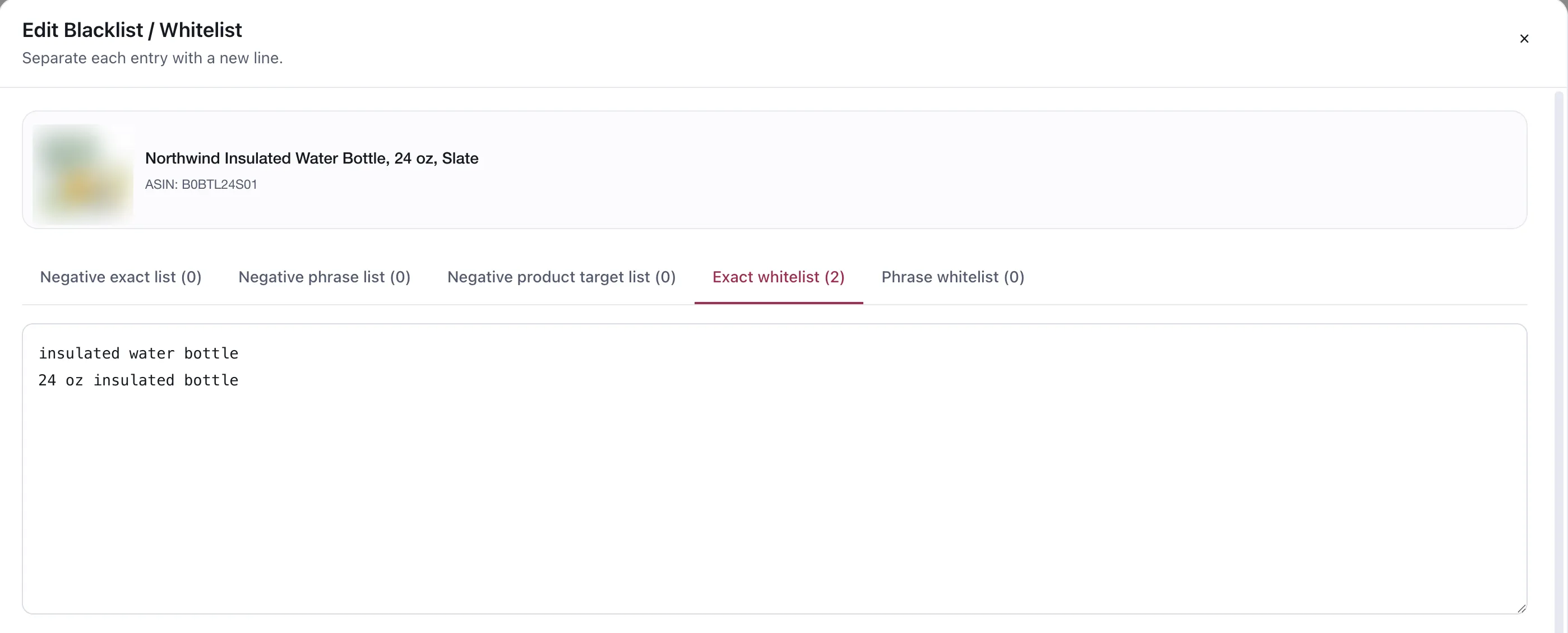
Five lists on one product, each with its own count. The entries are typed one per line.
Each product carries five lists, and each entry is one line:
| List | Effect |
|---|---|
| Negative exact | Block this exact query |
| Negative phrase | Block anything containing this phrase |
| Negative product target | Block this ASIN as a target |
| Exact whitelist | Protect this exact query from negation |
| Phrase whitelist | Protect anything containing this phrase |
When to use them instead of a rule
Section titled “When to use them instead of a rule”A competitor’s brand. No amount of good performance makes you want to keep paying for it — or, in the other direction, a defensive term you will keep bidding on however bad the ACOS looks.
A term that is commercially wrong. wholesale, bulk, for resale on a product you only sell
retail. The evidence may be fine; the customer is not the one you want.
A term you have already argued about. Whitelisting ends the argument permanently, rather than having a rule rediscover it every quarter.
If the answer depends on how the term performs, it is a rule. If the answer would not change however it performed, it belongs here.
Recommended keywords
Section titled “Recommended keywords”The App does not just take your lists — it suggests what to protect, ranked by how much room is left on a term before it stops paying: the money you could still spend on it over 60 days before it reaches your Target ACOS. A term with large positive headroom is one you are underspending on — which makes it exactly the term you would not want a negation rule to touch.
Only terms that have produced orders and have positive headroom are shown. The Target ACOS used is the one that resolved for the product, and the recommendation names where it came from — usually the Product Line.
Recommendations can be read at Product Group level, so a term that is thin on one ASIN is judged on the group’s evidence.
Nothing is added automatically
Section titled “Nothing is added automatically”The list is a suggestion. You select what to add, and the panel shows how many suggested terms are not yet on your list so you can see the gap.
That is deliberate and consistent with the rest of the product: the system prepares, a person decides.
Interaction with rules
Section titled “Interaction with rules”- A whitelisted term cannot be negated by a standard Negation rule, a Negation word rule or the Blacklist runner. If the same term is on both lists for one ASIN, Whitelist wins.
- A Negation rule’s Ignore the Whitelist switch lets that rule negate protected terms. It is off by default.
- A Negation rule’s Add to the Blacklist after apply switch records the term on the ASIN’s Blacklist only after Amazon successfully creates the negative. A proposal alone does not add it.
- An Import rule checks neither list. Its own Criteria and initial-bid settings fully determine what it imports.
- Unnegation does not consult either list. It is evaluated on its Criteria alone, so an unnegation rule can remove a negative the blacklist produced. Keep the two directions apart on terms you care about.
When an existing negative already covers the entry
Section titled “When an existing negative already covers the entry”A Negative Phrase already covering a term makes an additional Negative Exact unnecessary, so the App does not create the exact duplicate. The reverse is not true: a Negative Exact does not cover a broader Negative Phrase entry, and it does not cover a Negative Product Target entry.
Ad-type limits
Section titled “Ad-type limits”| Ad type | What can be created |
|---|---|
| Sponsored Products | Negative keywords and negative product targets, regardless of the ad group’s targeting type |
| Sponsored Brands | Negative keywords only in keyword-targeting ad groups; negative product targets only in product-targeting ad groups |
| Sponsored Display | No negative keywords |
See Negation and unnegate rule for where each sits in the order.
Considerations
Section titled “Considerations”- A phrase entry is wide. Check it is not inside terms you are still earning on.
- Lists are per ASIN. To block a term for several ASINs, add it to each ASIN’s list.
- Work is evaluated for every
(entry × ad group)pair, with no per-run quantity cap. On a large account, one bulk list can create thousands of negatives in one run. Add entries in batches and inspect Preview Changes before enabling the Objective. - Because they are permanent, review them occasionally. A blacklist entry from two years ago is still running and has produced no evidence since the day you added it.
VendlenPrivacy PolicyTerms of ServiceContact
© 2026 HELODA PTE. LTD. Not affiliated with or endorsed by Amazon.