

Preview Changes
Rules run on their own schedule. Preview Changes is optional — it is there for when you want to see what a rule would do at its next run before it does it.
It helps you review rules that meet their configured conditions but may produce outcomes that need further attention.
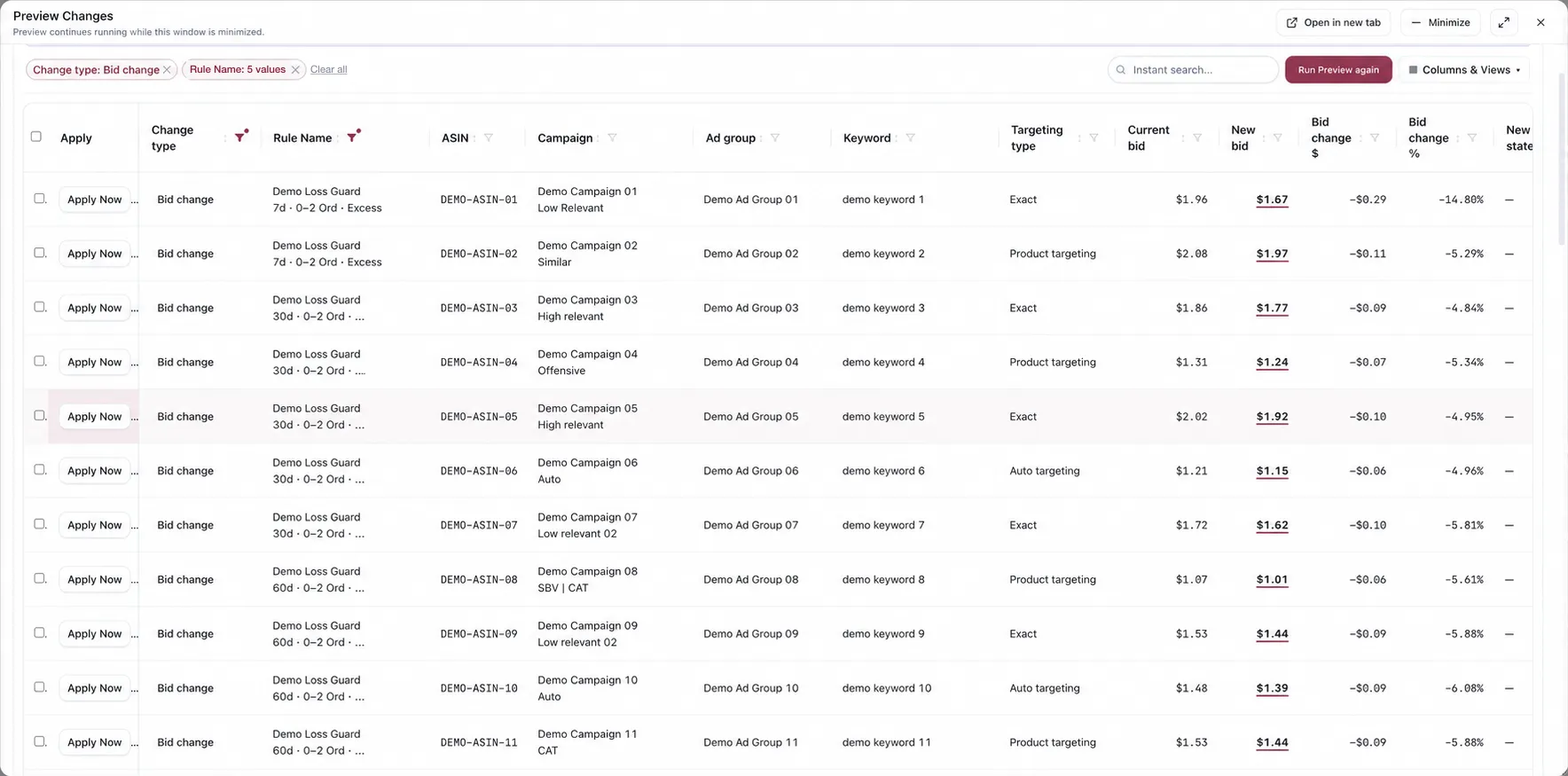
Preview Changes. Every value shown is a demo replacement.
What the table shows
Section titled “What the table shows”One row per change the run produced. Reading left to right, each row carries:
| Column | |
|---|---|
| Apply | An Apply Now button on that row |
| Change type | What kind of change it is — Bid change, and so on |
| Rule Name | Which rule produced it, with that rule’s window and criteria beneath the name |
| ASIN · Campaign · Ad group · Keyword | Where the change lands |
| Targeting type | Exact, Product targeting, Auto targeting |
| Current bid → New bid | The value now, and the value the rule wants |
| Bid change $ · Bid change % | The size of the move, in money and in percent |
| New state | Set where the change is a state change rather than a value |
Seeing current, new and the difference side by side is the point. A rule can be correct about the direction of a change and wrong about its size, and only the difference columns show that.
Narrowing the list
Section titled “Narrowing the list”A long preview is filtered rather than scrolled. The chips above the table show what is currently applied — Change type and Rule Name — each removable, with Clear all beside them. Instant search filters by text, and Columns & Views changes which columns are shown.
Run Preview again recalculates. The preview keeps running while the window is minimized, and Open in new tab moves it out of the dialog if you want to work through a long list.
Applying from here
Section titled “Applying from here”Apply Now on a row sends that one change to Amazon without waiting for the rule’s next run.
What to look for
Section titled “What to look for”The size of the largest moves. A rule that behaves sensibly across most of the list and makes one very large move on a single target is usually reading thin evidence on that target. Check its scope and its Data Window.
Targets you did not expect to see. These usually mean the rule’s assignment is wider than you thought, not that its criteria are wrong.
One rule dominating the list. Filter by Rule Name to see how much of the preview is coming from a single rule.
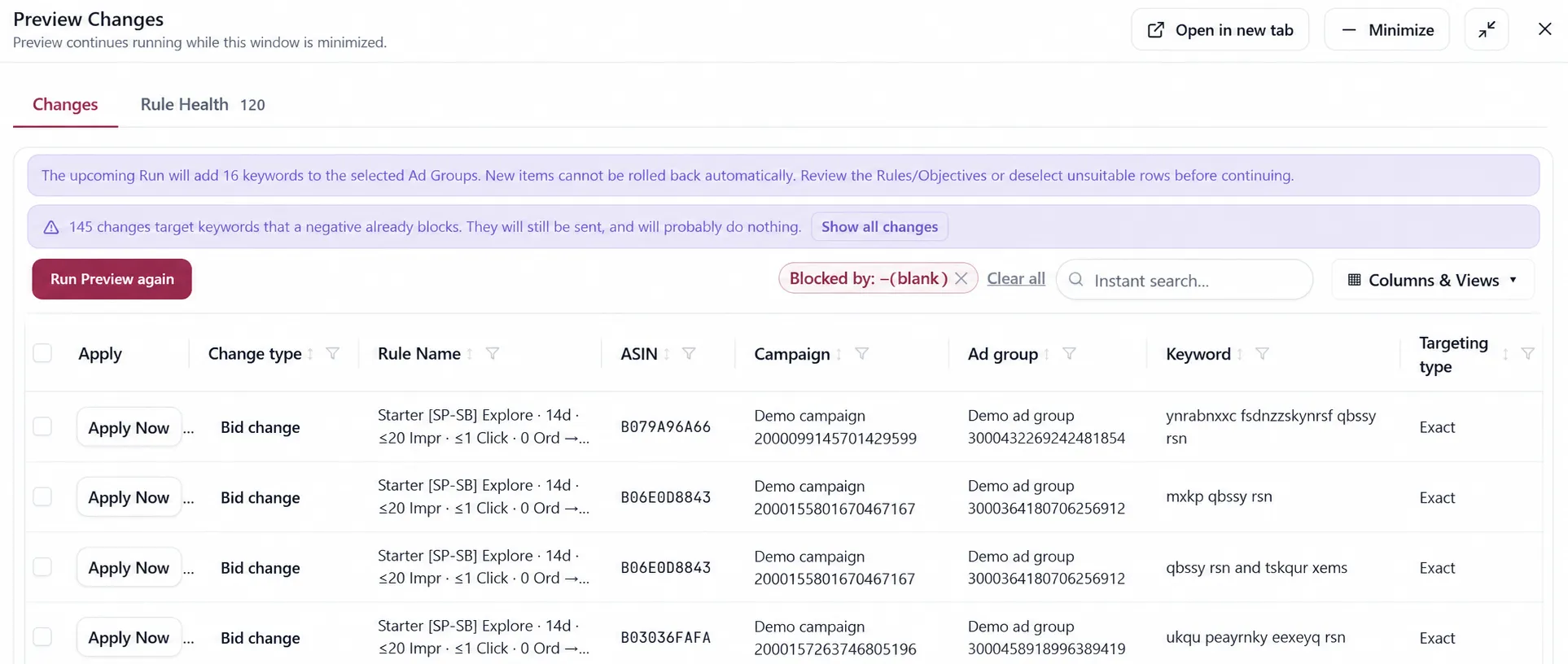
A bid or state change on a blocked keyword. Preview shows a warning when a Bidding action targets a keyword that an active negative covers. The warning appears for both bid changes and enable/pause changes; inspect the negative before applying the action.
Rule Health
Section titled “Rule Health”The Rule Health panel explains both the current evaluation and a rule’s recent history. The same columns appear in the Rules table.
| Column | What it answers |
|---|---|
| Stopped by | Which clause blocked the most candidates in this evaluation? |
| Firing | Has this rule produced changes across recent scheduled evaluations, and where has it stayed silent? |
| Days silent | How many consecutive days the rule has produced no change. Hidden by default, but available for sorting. |
Stopped by is per evaluation. A red icon means the leading blocker must usually be fixed outside the rule, often in Campaign settings. An amber icon means the rule’s own guardrail or limit kept the value unchanged. Open the tooltip to see the other blocking clauses and examples.
Firing is a multi-day history. It distinguishes a rule that is not assigned to an ad group from one with no candidates, and both from one whose candidates repeatedly failed Criteria.
The stop reasons also include:
- Amazon keeps undoing this change — Automation stopped retrying — Amazon repeatedly reversed an applied action, so the App opened the circuit instead of sending it forever.
- Amazon permanently rejected this keyword text — retrying the same keyword cannot succeed.
- You excluded this row from Automation — an active manual hold covers the action.
Considerations
Section titled “Considerations”- A preview is per run. It is not a standing list of everything the rule will ever do.
VendlenPrivacy PolicyTerms of ServiceContact
© 2026 HELODA PTE. LTD. Not affiliated with or endorsed by Amazon.