

Preview and create
For Create Campaign and Create Campaign Set, nothing is written to Amazon until the final confirmation. Preview is where a large expansion stops being an abstraction and becomes a list you can read. Edit Campaign has its own review and apply flow for existing resources.
What the preview shows
Section titled “What the preview shows”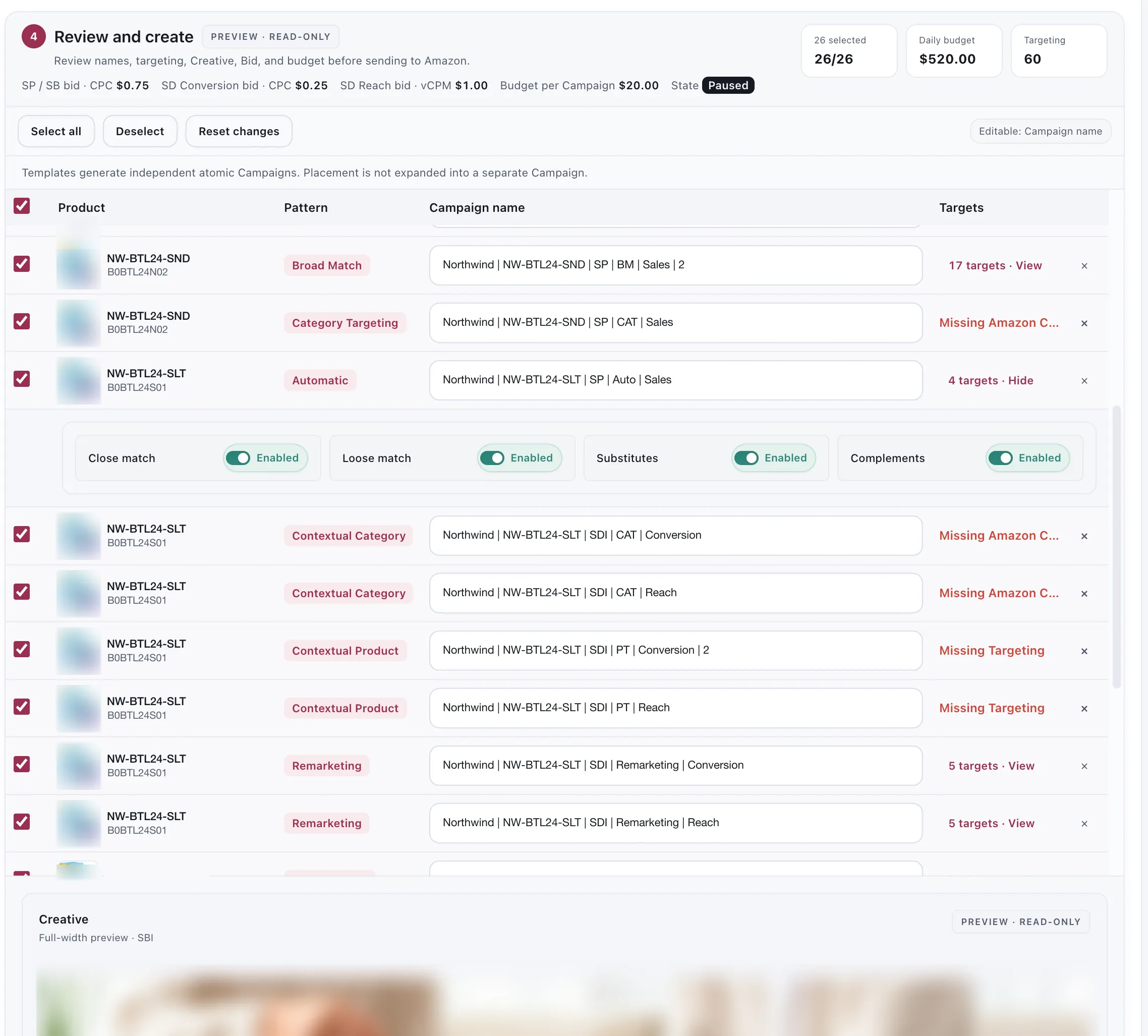
One row per campaign, before any of them exists.
Every campaign the run will create, with its ad group and targeting underneath. Automatic Bulk rows show the expanded campaign count. The preview includes the exact entities and dependency waves that will be sent, rather than only the template count.
A counter at the top reads how many are selected — 26 selected · 26/26 — and Select all, Deselect and Reset changes sit above the table. A campaign you deselect is not created.
Placement is not expanded into a separate campaign. The header says so, and it is worth knowing before you count: placement adjustments live inside a campaign rather than multiplying the set.
What you can change here
Section titled “What you can change here”Rename anything. Campaign names are what you will live with in reports for years. The generated name is a sensible default, not a decision — if your account has a naming convention, this is where it gets applied.
Remove targeting. A recommended keyword that is wrong for this product can be dropped from the set here, without going back a step.
Enable or pause an automatic targeting type. An Automatic campaign carries four of them — close match, loose match, substitutes and complements — and each can be switched off here before the campaign exists.
Move an image’s focal point. The creative preview is adjustable, so the part of the image that survives Amazon’s crop is a decision rather than an accident.
Drop a campaign. Each row carries a remove control and the counter above the table follows it. A row that cannot be created yet says why — Missing Targeting, Missing Amazon Category — so the count you create is the count that is actually ready.
Bids and budget are not editable in the Set preview: they are set at the bid step. In Create Campaign, each campaign row keeps its own bid and daily budget.
What to check before creating
Section titled “What to check before creating”The total. The daily budget you entered applies to each campaign, not to the set — so the number that matters is the campaign count, and that is not the number on the template badge.
The badge counts campaign types. The campaigns are types × selected ASINs, and each Sponsored Display type doubles again if you chose Conversion + Reach. Read the total off Preview, which is the first place the real count exists.
The targeting spread. A keyword appearing in the Exact, Phrase and Broad campaigns is intended — that is what atomic structure is for. A keyword that is simply wrong appearing in all three is worth catching now.
The names. See above. Renaming fifty campaigns after they exist is a worse afternoon.
Nothing starts spending. Every campaign and ad group a creation run writes is created paused. Creating the structure costs nothing; you enable what you want in Ads Manager when you are ready.
After you create
Section titled “After you create”The campaigns exist in Amazon and behave like any others. From that point:
- Ads Manager is where you read and adjust them by hand.
- Automation is where you set the rules that manage them.
- Change History records what happens to them afterwards.
A Campaign Set builds structure. It does not manage that structure — nothing keeps the campaigns in sync with the template after creation, and editing the template later does not reach back into campaigns it already wrote.
Considerations
Section titled “Considerations”- Creating is not reversible from here. Campaigns, ad groups, product ads and targets created by the App stay in the Amazon account; new targets cannot be deleted. You can pause or edit supported fields afterwards.
- The sender runs Campaign → Ad Group → Ad/Product ad → Target in dependency waves. Amazon can reject individual entities, so a run may finish partially. Successful steps are not resent automatically; check Action Center and Change History before retrying.
Environment and access gates
Section titled “Environment and access gates”The final action depends on your environment and seller profile:
- In Development, the App builds a payload preview and may allow a confirmed canary send.
- In Production, the same server validation runs before a LIVE send. A kill switch or missing contract/canary can block the send while leaving the payload available for review.
- You need Campaign Builder Edit permission, an active plan with Campaign Builder access, and an Amazon connection that allows writes. Without them, you can review but the send action stays paused.
VendlenPrivacy PolicyTerms of ServiceContact
© 2026 HELODA PTE. LTD. Not affiliated with or endorsed by Amazon.