

Dayparting rule
Dayparting is the only rule that acts on the clock. It holds a repeating weekly schedule and, every hour, applies whatever that hour’s cell says.
It also has a second mechanism that is easy to miss: a Dayparting rule can carry Criteria, and the App picks which rule an Objective runs each day based on how that ad group is actually performing. So the schedule is not only fixed hours — it can switch itself.
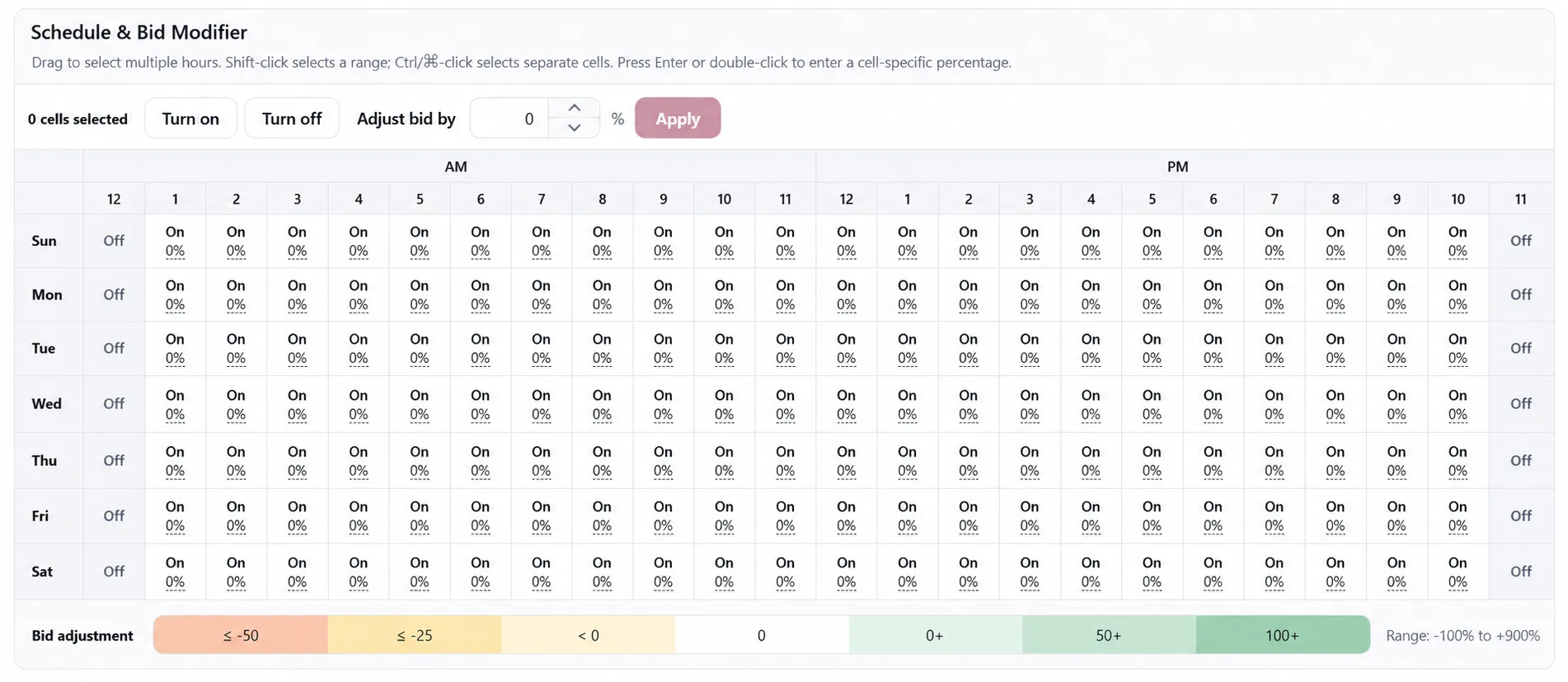
The week is 168 cells
Section titled “The week is 168 cells”Seven days by twenty-four hours. Each cell holds either a bid modifier percentage or Off, and the schedule repeats every week. Hours are read in your marketplace timezone, not your own.
A sample week: Off overnight, trimmed in the small hours, flat through the morning, raised through the afternoon and hard into the evening peak, with a different weekend shape. The values are an illustration, not a recommendation.
The three things a cell can say
Section titled “The three things a cell can say”On, with a modifier
Section titled “On, with a modifier”The rule moves each target’s bid from the ad group’s baseline bid by the cell’s percentage. A
baseline of $1.20 in a +25% cell becomes $1.50, and in a −30% cell becomes $0.84. The result is
clamped to the bid limits Amazon allows for that ad product and cost type. The adjustment range is
−100% to +900%.
It is always computed from the baseline, never from the bid the previous hour left behind. Cells do not compound.
On, at 0% — a hold
Section titled “On, at 0% — a hold”0% is an explicit setting, not an empty value. It restores the overlay to the baseline bid for
that hour instead of keeping the previous hour’s modifier.
This setting does not block other rules. Dayparting and Bidding operate independently. A 0% Dayparting hour is therefore different from a Hold created by a Bidding rule with a 0% adjustment, which blocks lower-priority Bidding rules.
The ad group is paused for that hour.
Two consequences worth knowing before you rely on it:
- Target bids are not restored when an hour goes Off. Pausing the ad group is the mechanism; the bids simply stop mattering until it comes back on.
- Coming back On restores the ad group’s baseline state, not “enabled”. If you had deliberately paused that ad group yourself, Dayparting leaves it paused and skips it. It will never switch on something you switched off.
Criteria: letting the schedule switch itself
Section titled “Criteria: letting the schedule switch itself”A Dayparting rule can include Dayparting Criteria, allowing the schedule to respond to performance as well as time.
For each marketplace day and Objective, the App selects one Dayparting rule:
- Candidate rules are ordered by Priority, with the highest first.
- The first rule whose Criteria pass is selected. A rule with no Criteria always passes and serves as the fallback.
- If no rule passes, the Objective has no effective Dayparting rule for that day, so nothing is applied.
Criteria are checked against the Objective’s performance. The App combines the performance of every assigned ad group across both a 30-day and a 60-day window. Both windows must pass.
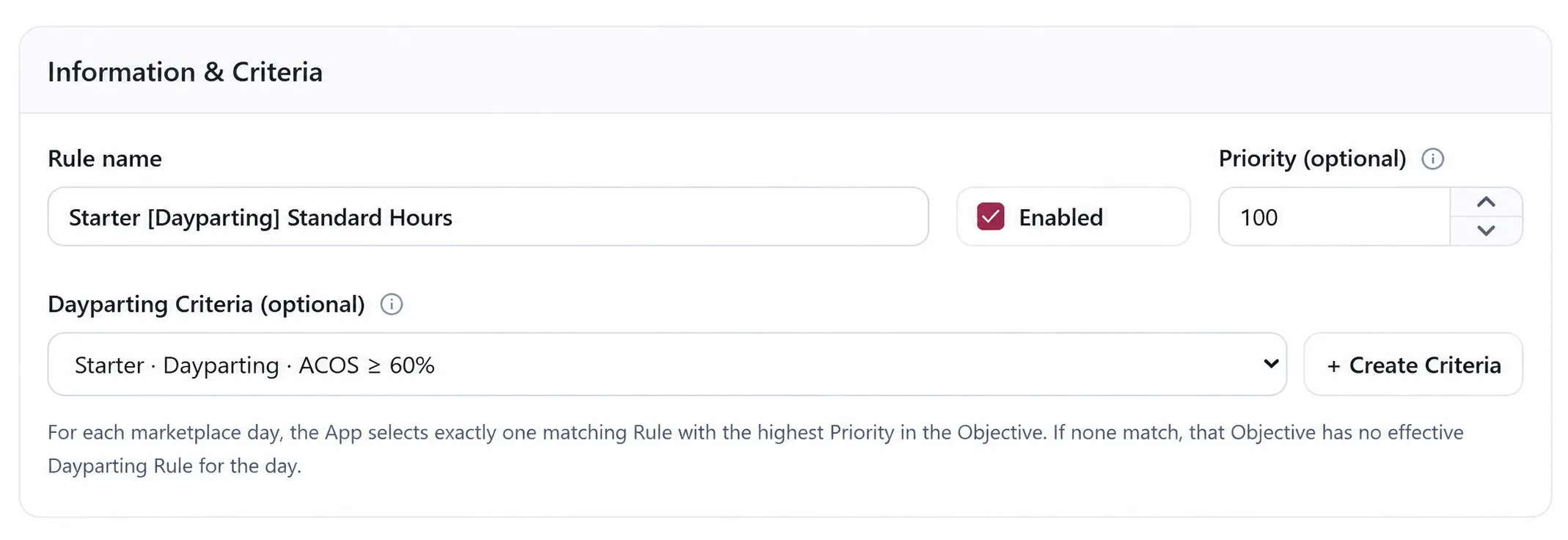
Two things follow from that. The two-window check is deliberate: it stops a single strong or weak fortnight from flipping the schedule. And because the decision is made per Objective from aggregated numbers, one ad group having a bad month does not move the schedule on its own — which is the right behaviour when the whole point of an Objective is that its members share a stance.
What that buys you
Section titled “What that buys you”Write two rules against one Objective:
- Priority 200 — “Peak shape”, Criteria: performing above your ACOS ceiling. Aggressive evening modifiers.
- Priority 100 — “Defensive shape”, no Criteria. Flat 0% with the overnight hours Off.
The Objective now runs the aggressive schedule while the ad group is earning it, and falls back to the defensive one when it is not — decided daily, without you touching it.
Order matters more than it looks: put the unconditional fallback at the lowest priority, or it wins every day and the conditional rules never get a turn.
Setting the schedule
Section titled “Setting the schedule”In Edit Dayparting Rule, the grid is directly editable:
| To do this | Do this |
|---|---|
| Select a block of hours | Drag across them |
| Select a range | Shift-click the far end |
| Select scattered cells | Ctrl-click, or ⌘-click on a Mac |
| Set one cell exactly | Press Enter, or double-click it |
| Apply to everything selected | Turn on, Turn off, or type a percentage into Adjust bid by and press Apply |
The toolbar shows how many cells are selected, so you can confirm the selection before applying a change to it.
Above the grid sit the rule’s name, its Enabled switch, its Priority (100 by default), and the optional Dayparting Criteria.
It is an overlay, not an edit
Section titled “It is an overlay, not an edit”Dayparting writes a transient hourly overlay. It does not change the canonical bid or state your other rules work from, and it does not write a Change Log entry.
That is why a Dayparting hour and a Bidding rule can both be in force without fighting: the Bidding rule owns the baseline, and Dayparting is a temporary multiplier over the top of it.
Use cases
Section titled “Use cases”A category that only converts in the evening. Off overnight, 0% through the working day, and a
strong positive modifier for the hours your orders actually land. You stop paying for impressions
that never convert, without lowering your position when it matters.
A budget that burns out by noon. Trim mornings with a negative modifier rather than lowering the bid outright. The bid recovers on its own in the afternoon cells; you never have to remember to put it back.
A weekday/weekend split. Two different day shapes in one schedule, which is exactly what a 7 × 24 grid is for.
A schedule that backs off on its own. The two-rule Criteria pattern above: aggressive while the ad group is performing, defensive when it is not, re-decided every marketplace day.
A launch you want off at night. Off cells overnight while you watch the first weeks, without touching the campaign’s real state.
Considerations
Section titled “Considerations”- The schedule reads in marketplace time. If you work in a different timezone, the cell you are looking at is not the hour on your own clock.
- The overlay is transient by design, so a Dayparting bid change does not appear in Change History the way a rule-applied change does. Look at the Dayparting run instead.
- An ad group with a paused baseline is skipped entirely. If a Dayparting rule appears to do nothing, check that first — then check whether its Criteria matched that day.
- Because bids are computed from the baseline, changing the baseline changes every cell’s result at once. That is usually what you want, but it is worth knowing before you edit one.
- A rule with Criteria that never match is silently inert. There is no error; it simply never wins the daily selection.
VendlenPrivacy PolicyTerms of ServiceContact
© 2026 HELODA PTE. LTD. Not affiliated with or endorsed by Amazon.