

Negation and unnegate rule
A negation rule blocks a search term. An unnegation rule restores one. They are configured as two-way rules because the second is what makes the first safe to run.
What it does
Section titled “What it does”Four actions are available:
| Action | Effect |
|---|---|
| Create Negative Exact | Block this exact query |
| Create Negative Phrase | Block any query containing this phrase |
| Remove Negative Exact | Restore an exact-negated query |
| Remove Negative Phrase | Restore a phrase-negated query |
The change is always local
Section titled “The change is always local”However wide the evidence, the negative is created only in the ad group the rule is assigned to. A rule reading at Product Group scope does not write negatives across the group.
Close variants are one decision family
Section titled “Close variants are one decision family”The App does not score spelling variants as unrelated rows. It builds one comparison key by
removing diacritics, punctuation, a trailing plural s, and the function words and, or, the,
of, for, with, in, on, at, by, to and from.
Within each campaign and ad group, search terms with the same key form one close-variant family.
dandelion and root tea and dandelion root tea, for example, are evaluated together.
The rule then:
- sums performance across the entire family;
- evaluates Criteria against that total;
- produces at most one negative for the family; and
- uses the highest-spend member as the negative text.
This applies in both directions: creating a negative and removing one. The decision is aggregated, but Preview keeps the evidence readable by listing the individual members — the top 3 when creating a negative and up to 8 when removing one — and states how many search terms were scored together.
Safeguards fail closed for the whole family. If any member is whitelisted, has an order when the zero-order safeguard applies, or is already covered by a negative, the rule leaves the whole family unchanged. Negative product targets are ASINs rather than text variants and continue to evaluate one row at a time.
Triggers
Section titled “Triggers”A Negation rule chooses between two trigger modes:
- Standard Criteria — the default. Best for no-sale, low-sale and high-ACOS terms that a single Data Window settles.
- Performance Deterioration — for terms that previously converted and have since stopped, confirmed at both a 60-day and a 30-day checkpoint against a longer Historical Window.
The two guards available on Bidding rules, Loss Budget Guard and Momentum Guard, are not offered here. Negation has its own pair.
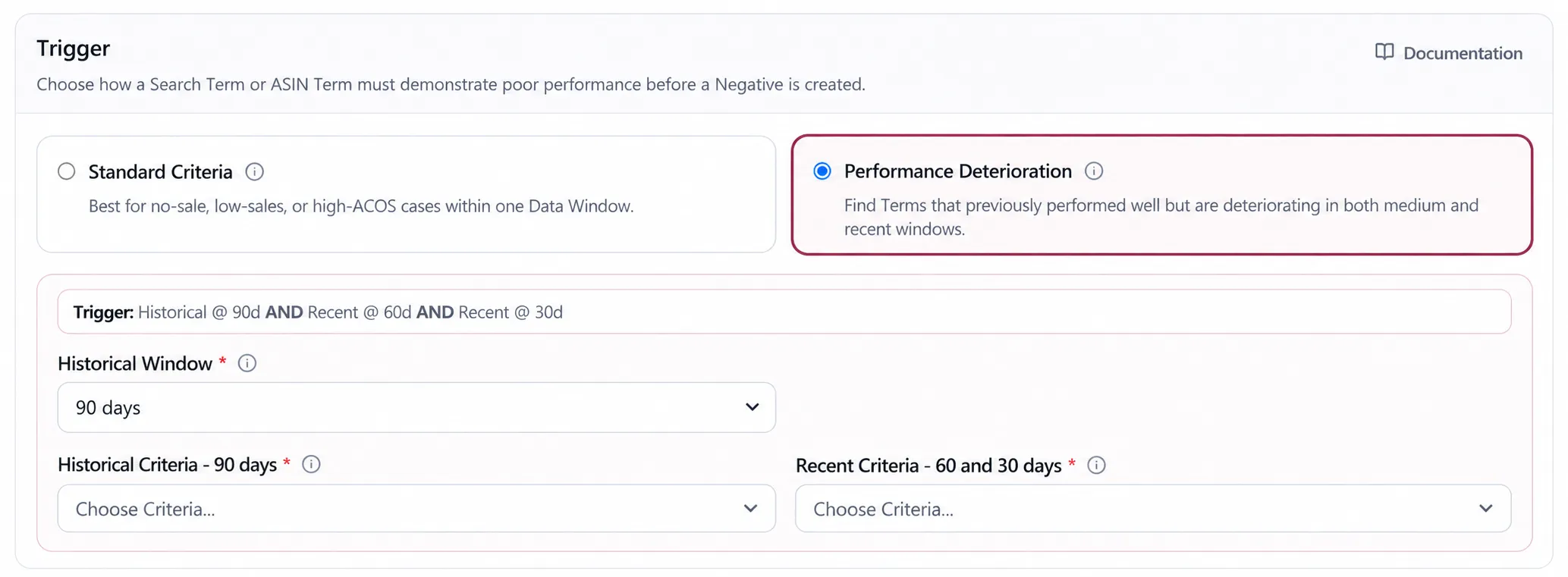
An unnegation rule always runs Standard Criteria. Performance Deterioration is the shape “was good, now bad”, which is the right direction for creating a negative and exactly the wrong one for removing it, so a rule set to unnegate is forced back to Standard Criteria rather than inheriting three checkpoints that would mean nothing.
Both directions read evidence at Individual ASIN or Product Group scope. Individual ASIN is the default, and unnegation uses the same setting.
Scope matters more here than anywhere else in Automation:
- Negation at ASIN scope blocks a term based only on how it performed against this product. That is correct when the product has its own shopper.
- Negation at group scope blocks it based on the aggregated evidence of the Product Group, which is denser and settles faster on low-volume terms.
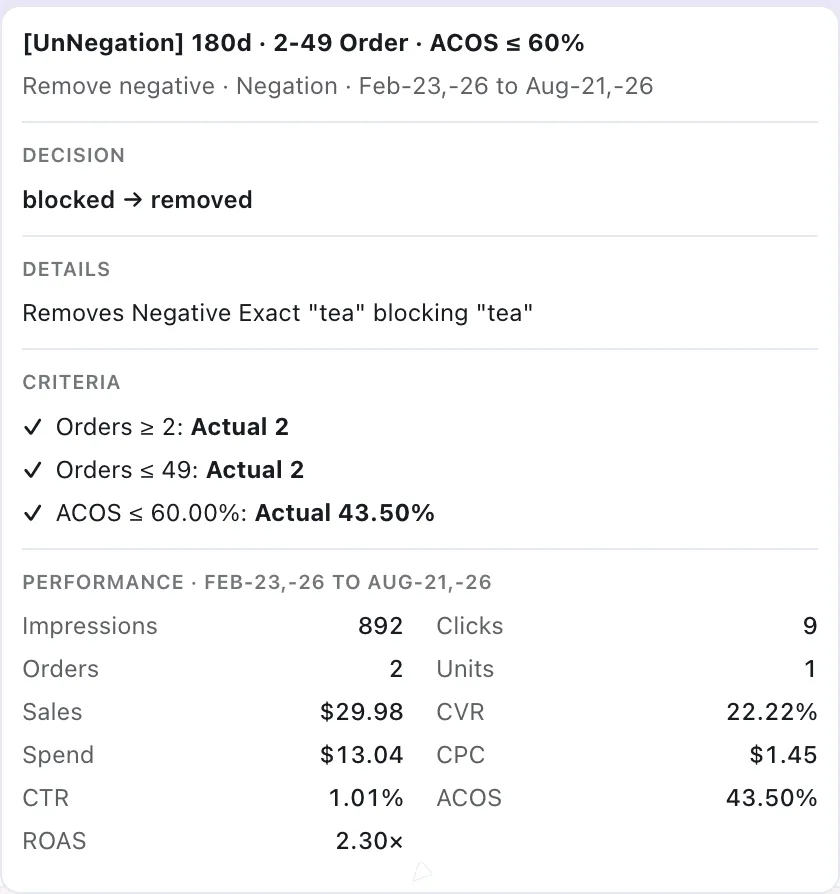
An unnegation decision carries the evidence that the blocked term is still earning.
Why unnegation exists
Section titled “Why unnegation exists”A term that is negated for an ASIN no longer generates evidence for that ASIN. At ASIN scope, this can make the term appear inactive, even when the decision was incorrect.
At Product Group scope, the same query may continue to generate orders for other products in the group. This is the signal unnegation uses: the term remains effective elsewhere and may have been blocked too narrowly.
Without unnegation, negation only moves in one direction.
The 365-day orders checkbox
Section titled “The 365-day orders checkbox”This checkbox is enabled by default. It skips any term that produced an order within the past 365 days at the selected scope.
It accounts for seasonality. A term that sold last November but has been quiet since is different from one that has never sold, and a 90-day window cannot show that distinction. At Product Group scope, an order from any product in the group counts.
Unnegation does not use this setting. It applies only when creating negatives.
Selecting Performance Deterioration turns the checkbox off because both settings rely on converted terms. If you enable it again while the Historical Criteria requires orders or sales, the rule may have no eligible terms to act on.
Terms already covered by an existing negative are skipped, so the rule does not create duplicate negatives. An exact rule also skips terms already covered by a phrase negative.
Negative coverage uses the same close-variant key as family scoring. A differently punctuated, pluralised or function-word spelling can therefore count as the existing negative in both Negation and Unnegation.
Word limits
Section titled “Word limits”Amazon limits Negative Phrase to 4 words and Negative Exact to 10 words. The App stops a longer candidate before delivery and marks it permanently skipped, rather than sending and retrying an action Amazon cannot accept.
Whitelist and Blacklist switches
Section titled “Whitelist and Blacklist switches”Whitelist protects terms from negative creation by default, including ordinary Negation, Negation word and Blacklist actions. Two switches let a Negation rule participate in that workflow:
- Ignore the Whitelist allows this rule to negate a protected term. It is off by default.
- Add to the Blacklist after apply adds the term to the ASIN’s Blacklist only after Amazon has successfully created the negative. A staged or failed proposal is not recorded there.
Considerations
Section titled “Considerations”- Exact and phrase are not interchangeable. A phrase negative can block queries you have never seen, including future ones. Use it when the losing pattern is the phrase itself, not one query.
- Blocking a term at ASIN scope while the group is still converting on it is a legitimate decision — but make it deliberately, not by leaving the scope on its default.
- Coverage is one-way: an exact-match rule skips a term a phrase negative already covers, but an existing Negative Exact does not cover a broader Negative Phrase or a product target.
VendlenPrivacy PolicyTerms of ServiceContact
© 2026 HELODA PTE. LTD. Not affiliated with or endorsed by Amazon.