

Loss Budget Guard
Available on Bidding rules. Loss Budget Guard is not a fixed ACOS rule. It measures the money, not the ratio.
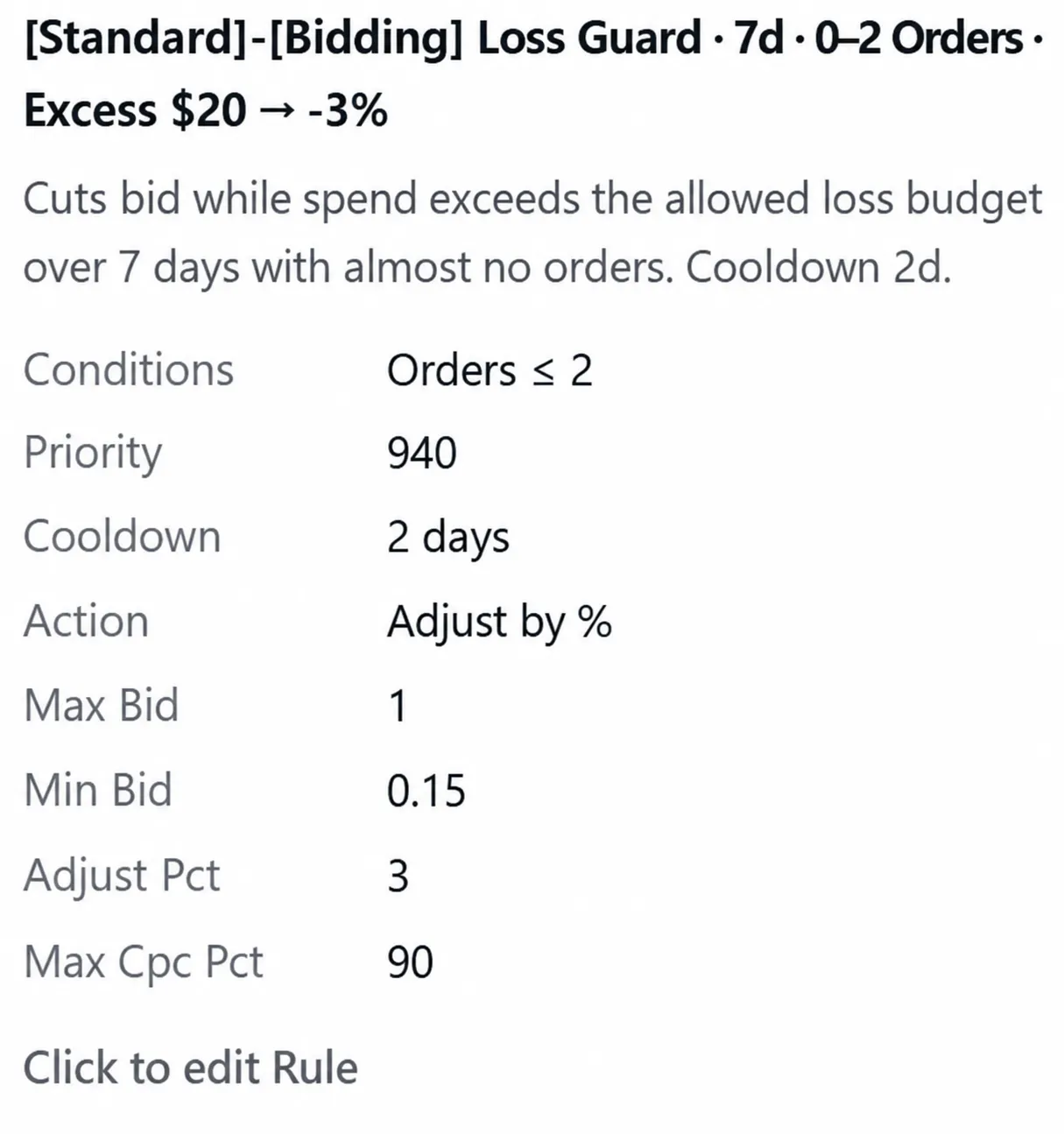
The analysis shows the allowance the rule computed and how far past it the target went.
What it measures
Section titled “What it measures”This trigger has two required settings, and they do different jobs.
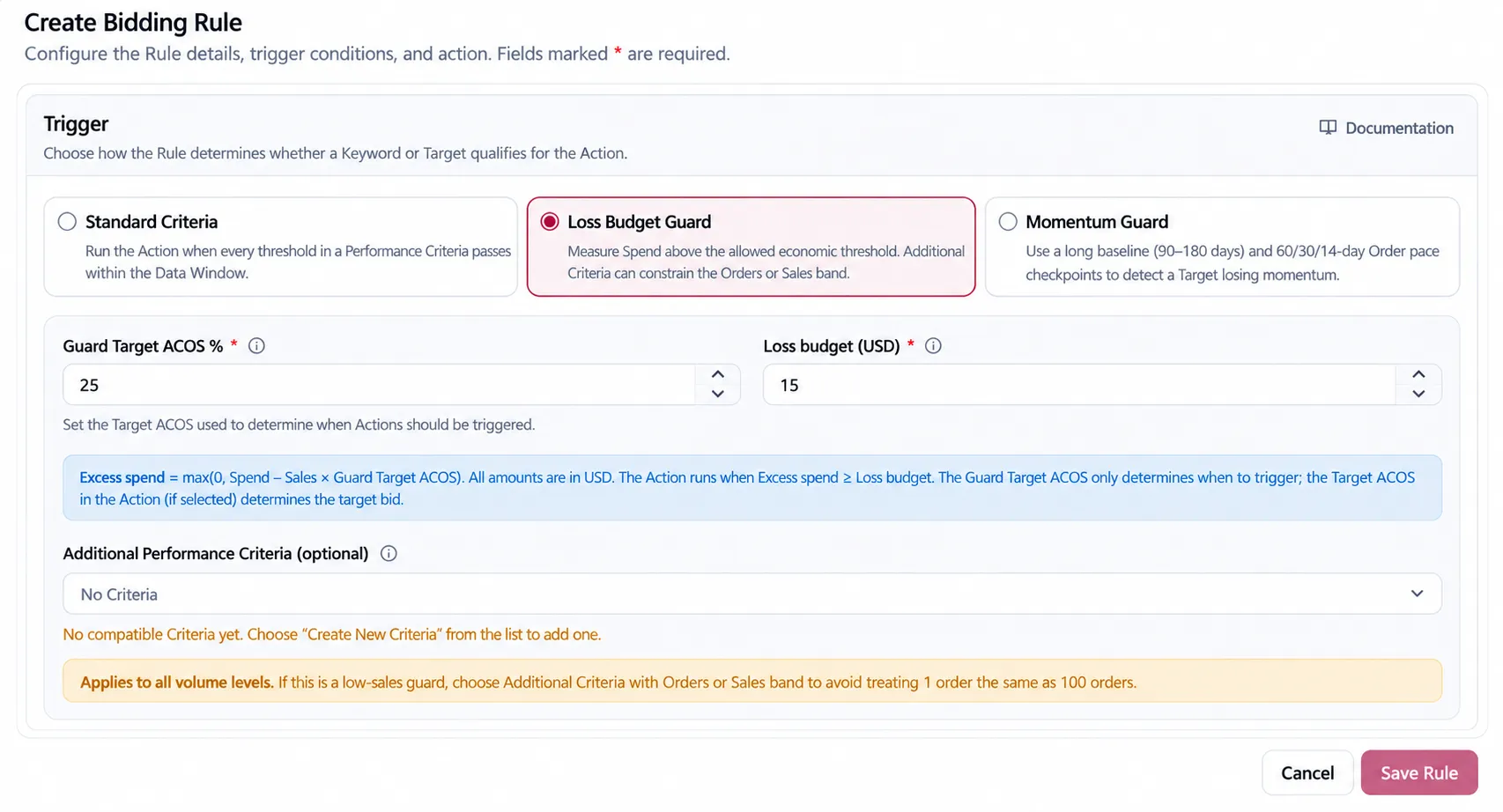
Guard Target ACOS defines the spend you are willing to accept for the sales a target produced. Anything spent above that allowance is the loss.
Loss budget is a currency amount, and it is what decides whether that loss is worth acting on. The rule fires once the loss reaches it.
The calculation is:
Allowed Spend = Sales × Guard Target ACOSExcess Spend = max(0, Spend − Allowed Spend)Trigger = Excess Spend ≥ Loss Budget AND Additional Criteria, when selectedRead them together: Guard Target ACOS sets how much loss is allowed per unit of sales, and Loss budget sets how much loss is worth a change. A target can be far past its allowance and still be left alone, because the money involved has not reached the budget.
Why this is different from an ACOS threshold
Section titled “Why this is different from an ACOS threshold”An ACOS threshold looks only at the ratio, so two targets at 120% ACOS appear identical. One may have spent $8, while the other spent $800. The threshold treats both as the same breach and applies the same urgency. The figures below are illustrative and do not represent measured performance.
Loss Budget Guard also considers the amount involved. A small overspend on limited spend receives a smaller response, while a larger overspend receives more attention. This helps reduce unnecessary noise from minor breaches.
Worked example
Section titled “Worked example”A target has $100 in Sales and $70 in Spend inside the Data Window. Guard Target ACOS is 50%,
so the allowed spend is $50. The remaining $20 is Excess Spend.
| Value | Calculation | Result |
|---|---|---|
| Allowed Spend | $100 × 50% |
$50 |
| Excess Spend | max(0, $70 − $50) |
$20 |
| Loss Budget | Entered on the rule | $15 |
The monetary guard passes because $20 ≥ $15. If Additional Performance Criteria is selected, it
must pass too before the action runs. The figures are an illustration of the arithmetic, not
measured performance.
Constraining the band
Section titled “Constraining the band”You can optionally add Additional Performance Criteria to constrain the band the guard applies to — for example Orders at or below 2, or Clicks at or above 10. It is evaluated as an AND after the monetary guard. It does not change Allowed Spend or Excess Spend.
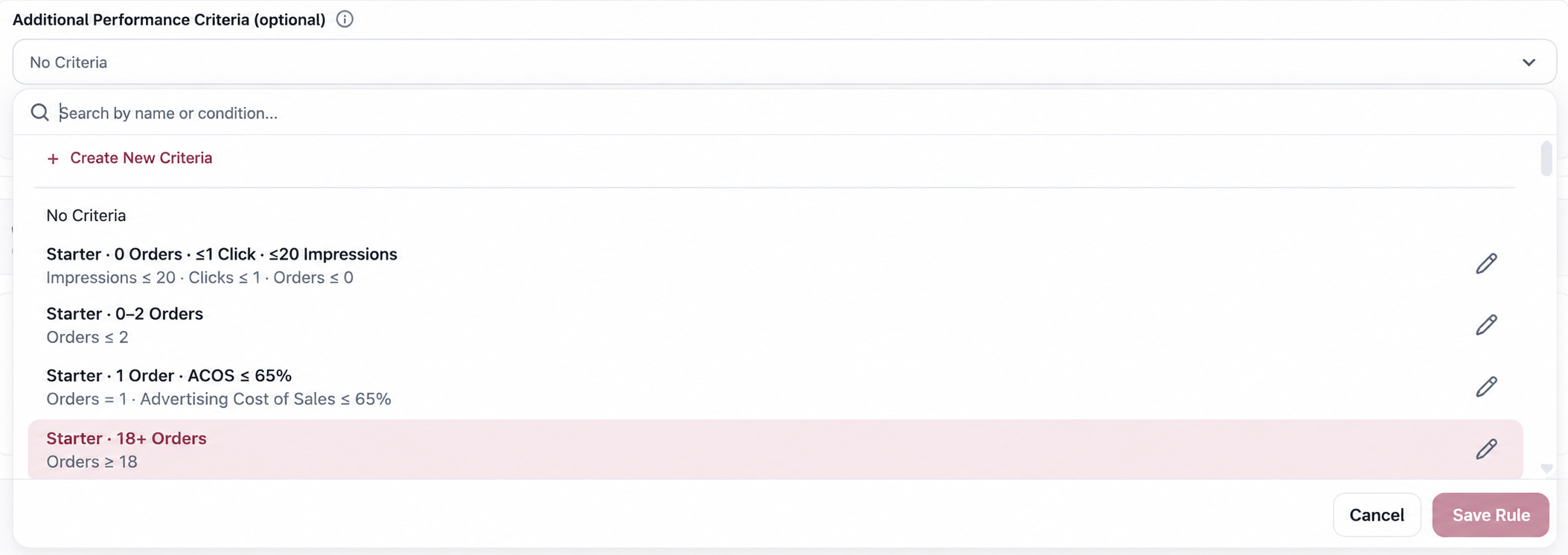
No Additional Criteria means the guard applies at every volume level. Add an Orders or Sales band when the same dollar loss should lead to different decisions on a one-order target and a hundred-order target.
Guard Target ACOS and the action Target ACOS
Section titled “Guard Target ACOS and the action Target ACOS”When you first choose Loss Budget Guard, the editor initializes Guard Target ACOS from the Target ACOS action when one is available. That is a starting convenience, not a permanent link. Editing Guard Target ACOS separates the two values:
- Guard Target ACOS decides whether enough money has been lost to trigger.
- Action Target ACOS decides the bid the rule proposes after it triggers.
Keeping them equal is reasonable when one economic target should govern both decisions. Separating them is useful when you tolerate a wider loss band before taking a more conservative bidding action.
When to use it
Section titled “When to use it”- When you want to control absolute loss rather than a ratio.
- When ratio-based rules have been firing on targets whose spend is too small to matter.
- When the same allowance should apply across targets of very different sizes.
When not to use it
Section titled “When not to use it”- When the decision is strictly about a performance level, such as “never operate above 80% ACOS.” Use Standard Criteria.
- When you need to detect a target declining against its own history while its ACOS remains acceptable. Use Momentum Guard.
- When there is no meaningful currency amount at which a breach becomes worth acting on. Without that operational budget, the trigger is harder to reason about than a direct threshold.
Considerations
Section titled “Considerations”- The allowance is derived from Sales, so a target with no sales in the window has an allowance of zero and all of its spend counts as loss. It still does nothing until that loss reaches the Loss budget — which is what stops a zero-sale target with two dollars of spend from generating work.
- The Data Window still decides which sales and which spend are counted.
- In the decision analysis, read Allowed Spend, Excess Spend, and the Loss Budget together. A high ACOS by itself does not explain why the guard fired or stayed quiet.
VendlenPrivacy PolicyTerms of ServiceContact
© 2026 HELODA PTE. LTD. Not affiliated with or endorsed by Amazon.