

Selling rate and buffer weeks
Everything downstream — the projection, the shortage, the order date — comes from two numbers per Sales SKU and sales channel.
Selling rate
Section titled “Selling rate”The rate you are actually selling at, per week, read across several windows rather than one.
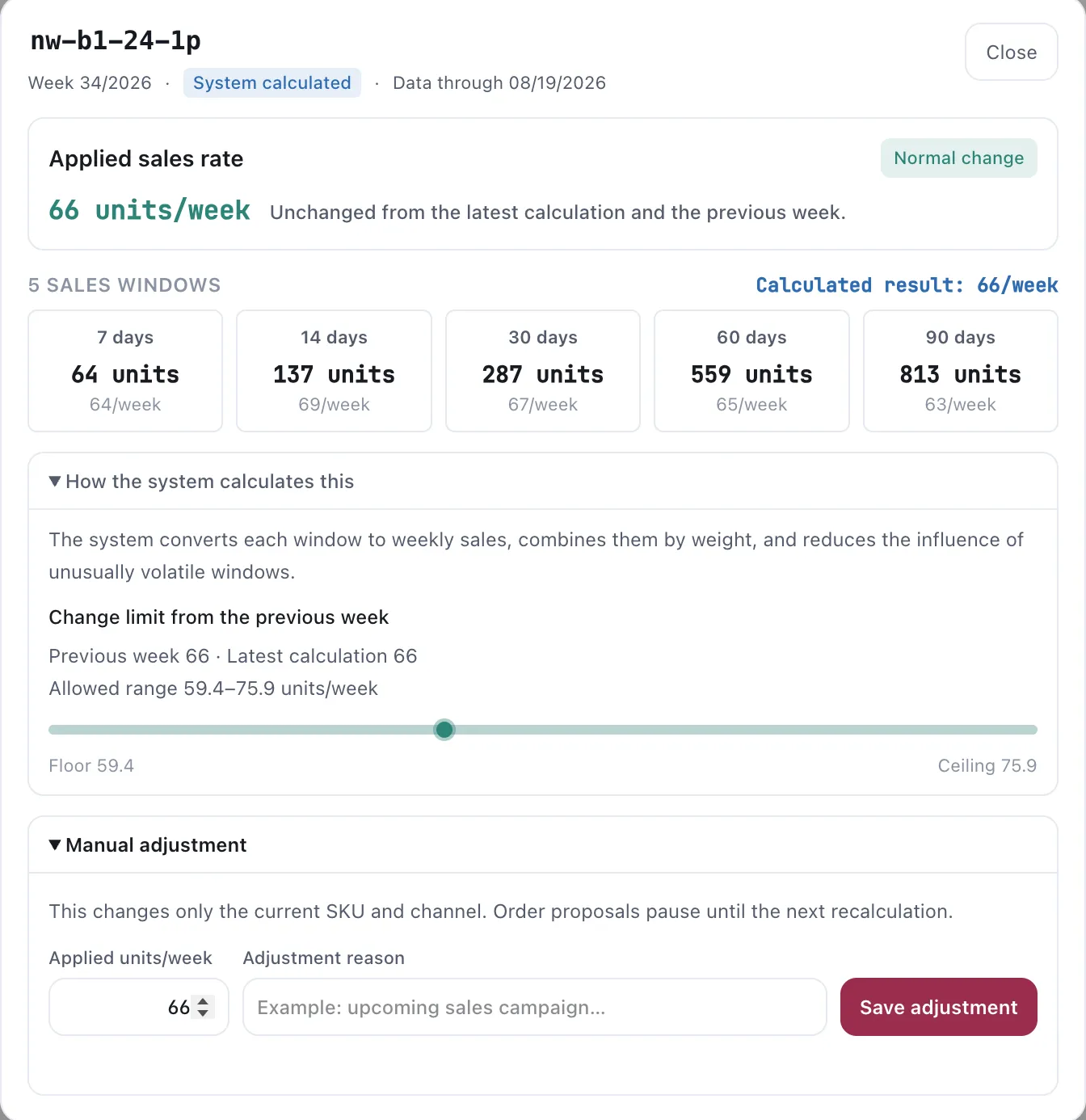
The rate on one Sales SKU, opened. Every number behind the applied rate is on the same screen.
The five windows
Section titled “The five windows”The panel shows 7, 14, 30, 60 and 90 days, each converted to a weekly figure so they compare on one line. The source is the selected channel: Amazon, Walmart, or TikTok.
Read them as a shape rather than five numbers. Five windows that agree mean a settled product. A 7-day figure well above the 90-day one means something changed recently.
The change limit
Section titled “The change limit”The applied rate is not allowed to move freely from one week to the next. The panel shows a floor and a ceiling around the previous week’s applied rate, and the calculated result is held inside that range.
The band is not symmetrical: the rate rises faster than it falls, because being short costs more than holding a little too much. So a calculated result can sit below the applied rate and nothing change — that is the limit doing its job, not a fault.
The header tells you which week the rate belongs to, whether it was system calculated or adjusted by hand, and the date the underlying data runs through.
When Sales rate counts MCF orders is enabled in Planning settings, Amazon’s windows also include Multi-Channel Fulfilment units. MCF units still leave FBA, so including them makes replenishment demand visible. The option takes effect the next time you refresh the rate.
Adjusting it by hand
Section titled “Adjusting it by hand”You can override the applied rate on a SKU, with a reason. Two things are worth knowing before you do:
- The override applies to that SKU and channel only. It does not propagate to the rest of the group or the product line.
- Order proposals pause until the next recalculation. The App will not plan against a number a person has just changed until it has recalculated around it.
Use it for something you know and the data cannot: a promotion starting, a competitor going out of stock, a listing that was suppressed for half the window.
You can refresh only the rate from the Sales/week column. The main Recalculate proposals action performs the complete sequence instead: it refreshes selling rates and then rebuilds the proposals from those rates.
Buffer weeks
Section titled “Buffer weeks”How many weeks of cover you want to hold. You set it; Vendlen does not guess it.
This is a commercial decision, not a calculation. It encodes how much risk you are willing to carry against how much cash you want tied up in stock. A product with a reliable supplier and steady demand can run a thinner buffer than one with a three-month lead time and a seasonal peak.
Each SKU × channel carries its own buffer. The default is set in Planning settings; edit a row in Finished goods only when that channel needs a different cover. Amazon’s buffer covers AWD + FBA, Walmart’s covers WFS, and TikTok’s covers FBT.
How the two produce a date
Section titled “How the two produce a date”The projection works backwards from the buffer level, through:
- Production time — how long the manufacturer needs.
- Transit time — how long it takes to arrive.
- The review period — how long until proposals are recalculated, because an order you could have placed this week and did not is a week you have to cover.
- The expected arrival date at FBA or AWD.
The result is the week a plan has to be placed for stock to land before cover is breached. Not a feeling about when you should probably reorder — a date.
Getting them right
Section titled “Getting them right”Selling rate. Check it against what you know about the product. A rate that looks wrong usually means a promotion, a stock-out, or a launch is sitting inside the window and distorting it.
Buffer. Set it from lead time first. A buffer shorter than your total production plus transit time means the projection can only ever tell you that you are already late.
VendlenPrivacy PolicyTerms of ServiceContact
© 2026 HELODA PTE. LTD. Not affiliated with or endorsed by Amazon.